Spyke

Posts

Looking for a robotics kit for a kid to work on together.

Hey all, like the title says, I'm looking for a robotics kit I can use with my young nephew.

I used to teach Lego Mindstorms years ago so that's kinda the level I'm looking at. Some things I would like for this go round though:

  • He's young enough that I think I want to start with a visual programming language instead of real code. I'll gauge his interest and move to real code if he seems like he wants to.
  • I would like to have the connection for the controller go to a computer as opposed to an app.
  • Linux compatible.
  • I would like it to build something that moves with something like wheels or treads.
  • No AI

Does anyone have any ideas? I've seen a lot online and have no idea if they are good brands or not.

View original on lemmy.world

Accessories for Wacom Pro Pen 3?

Hey All,

I just recently got the Wacom Movink Pro 14 and didn't realize the pen didn't come with the usual stuff the pen comes with if you purchase it separately. So I'm missing the grips and adjustable weight that it would otherwise come with and Wacom doesn't sell the pack separately.

Does anyone know of a good 3rd party equivalent?

Also, not even Wacom sells this, I'm looking for a pen clip for it. Either an attachment or a replacement for the rear barrel part of the pen. Curious if anyone knows of a solution for that too.

Thanks!

View original on lemmy.world

Make Haruna remember playlist position between playlists?

Hey everyone,

Basically the title. I have Haruna setup to automatically play the last playlist I had opened and it starts playing the video in that playlist at the spot I stopped watching. Exactly perfectly what I'm looking for. Until I change playlists.

Once the playlist changes to say playlist B, playlist A had lost its spot. If I open playlist A again, it starts at the beginning of the first video in that playlist.

Is there a way to make Haruna remember playlist and video position even when switching playlists?

View original on lemmy.world

T-Mobile temporary unlock?

Hey everyone,

I have a promotion on my phone right now that is preventing me from unlocking my pixel to put GOS on. I can't unlock it until I pay it off.

I also noticed an option on T-Mobile in the US to temporarily unlock the device. Obviously this would be a loophole but my question is this:

Has anyone used the temporary unlock and been able to then OEM unlock the phone to install graphene?

View original on lemmy.world

Unable to sign in to PS Portal.

I'm trying to use my portal and I'm getting an error stating it's not online even though it most certainly is.

I've already reset it, reconnected to my wifi, nothing is working. my Internet is fine, my PS5 can connect to psn fine.

when I look at the psn status page it says everything is online but there's a notice saying

"PlayStation Network services are up and running in your area, but your local internet is having problems that might affect your ability to sign in. For more information, contact your internet service provider."

is anyone else getting the same behavior?

View original on lemmy.world
rss·RSS - Really Simple SyndicationbyChocolateFrostedSugarBombs

Question about RSS's purpose...I feel like I'm missing something.

Hey all,

So I've been wanting to start using RSS recently. I've seen a lot of recommendations for using it to help curate what I'm interested in instead of what algorithms want me to engage with. But maybe I'm thinking of it wrong.

My understanding of RSS was that I find one of the many different RSS readers that I like, currently I'm using Akregator on Linux, then start subscribing to individual sites and sources. The idea being that I can go to one place and read everything I'm interested in.

But I can count on one hand, out of the 165 feeds I've subscribed to so far, the number that actually load the full article contents and images. Nearly every single one of them gives me a paragraph and a "Complete this story" or a "View full story here" or some other phrase.

If I load the full page inside the RSS app, I get all the nagware about signing up, give me cookies, just general obtrusive ads, blah blah blah. Obviously it's using an internal web engine and not my actual browser with my ad blockers and VPN extension and stuff. So instead I just double-click the RSS link and it opens in my normal browser and I read it there.

So, that gets down to the crux of my question...at this point, what's the difference between me just bookmarking the sites that I want and then just going there? If RSS only loads a paragraph anyways, what's the point in using it?

Now I do understand that this isn't RSS's fault as a protocol, it's how these sites are choosing to use it. I imagine they are just trying to get people to click to their site for views and whatnot but still...at least how I want to use it, it kinda defeats the purpose of RSS.

Am I missing something or is this something the community has been dealing with for a while now?

View original on lemmy.world

Insync blocking files due to Anti-Virus scan.

Hey all,

So I just migrated my Surface to Linux and I'm trying to get access to my Onedrive files. I'm using Onedriver right now but due to it reaching out for the files every time, I don't seem to have the ability to download them locally.

I found Insync and, although it's missing the files-on-demand feature, I think I could still get used to it. But when I sync my notes, Insync blocks them due to detecting malware.

I work in cyber security and my notes contain code snippets of malware so, it's not wrong, but I need to turn off that scanning feature. I can't find in the program where to do it. I posted on their support forums but haven't received a response yet.

I was curious if anyone here knew of how to turn that off? When my Surface was a Windows box, I just added an exception into Defender for the folder my notes are stored in but I don't seem to be able to do that in Insync.

Additionally, if anyone has an alternative to Insync that works, I'd be interested in hearing about it.

Thanks

View original on lemmy.world

[Solved] Touchscreen and Pen input not working on Surface Book 2 with Linux-Surface Kernel and CachyOS.

EDIT 2: I figured it out! The Nvidia driver was indeed installed, but I needed to remove it and instead install the dkms version.

sudo paru -S nvidia-open-dkms

Once that got installed, the surface kernel and headers successfully installed and now when I boot up the system, the linux-surface kernel shows up for me to choose. My touchscreen and pen input are working perfectly now with pressure sensitivity!

EDIT: I wanted to add some additional information regarding some errors that I've run into. There's a point in the Linux on Surface instructions where you need to run:

sudo pacman -S linux-surface linux-surface-headers iptsd

When I do, I get two sets of errors...although the install appears to complete.

Error set 1:

==> ERROR: module not found: 'nvidia'
==> ERROR: module not found: 'nvidia_modeset'
==> ERROR: module not found: 'nvidia_uvm'
==> ERROR: module not found: 'nvidia_drm'

Error set 2:

Error: mkinitcpio failed for kernel 6.15.3-arch-2-surface, skipping.

I'm not sure if either of these directly relate to the touchscreen and pen not working or if this is a completely different set of issues.

======================================================

I'm hoping someone on here may have some similar issues trying to get Linux running on Surface devices with the Linux-Surface project. I successfully installed CachyOS and got the wireless adapter working as well.

The touch input nor pen input seem to work at all. The screen successfully detaches and reattaches but the touch and pen input don't work with either mode.

Does anyone have any experience with this?

View original on lemmy.world

How to stop a specific 3rd party app from updating via Microsoft Store?

EDIT: I had mistakenly stated that Windows Update was where the issue was. I am experiencing this issue attempting to update my apps via the Microsoft Store. My question still stands, just added some clarifications and corrected my mistake.

I have the perpetual license for Clip Studio Paint. If you aren't familiar with their licensing model, basically I don't get the minor update versions (4.1, 4.2, etc). I only get security patches and hotfixes. My issue is every time Microsoft Store's update runs, it tries to install 4.1.0. Obviously, the Store is just seeing a new version present and isn't checking any licenses or anything. Is there a way to block CSP from ever updating through the Store?

If the program updates through the Store, then I have to uninstall it and reinstall the version I'm licensed for. When I do that the loop just starts over again because MS detects I'm not at the newest version anymore.

[Adding some answers to questions]

I did not install CSP via the Windows Store since some people have asked about that. I installed it via CSP's own installer downloaded from their website. The Microsoft Store update section seems to have recently started pushing 3rd party app updates which is where I believe this is coming from.

I also changed the picture to show more context as well as what is in the "..." menu option.

View original on lemmy.world

[Solved] [Help] RDP from Windows?

EDIT 2: Solved. I was sending uppercase characters when I would do the connection from MS RDP. My Pop OS login username has uppercase characters so I was just matching that. I got confused because the username defined in the Pop remote desktop settings is the same username, but spelled all lowercase. Once I altered the username I was sending from MS RDP to match exactly including casing, it worked.

As a side note, the default MS RDP app doesn't handle the resolution properly. I switched to using RDCMan from the Sysinternals Suite and it handles the resolution perfectly and you can set scaling on it so you don't have to worry about that. I'd recommend RDCMan if anyone else is running into the same issue.

EDIT: Error code image attached and extended details pasted here.

[Window Title]
Remote Desktop Connection

[Content]
An authentication error has occurred.
The token supplied to the function is invalid

Remote computer: [Redacted]

[^] Hide details  [OK]

[Expanded Information]
Error code: 0x0
Extended error code: 0x0
Timestamp (UTC): 08/05/25 01:32:11 PM
Activity ID: 2473cbfb-5b74-4229-8644-1cf6b0bb0100

Hey Everyone,

I was wondering if anyone can help troubleshoot an issue I'm having trying to RDP from my Windows 11 box to my Pop!_OS box.

I have Remote Desktop enabled in Pop and I've set the username and password.

When I try to connect from Windows using Microsoft's RDP application, I get an invalid token error.

Is anyone able to tell me what I'm missing in the setup?

Thanks

View original on lemmy.world

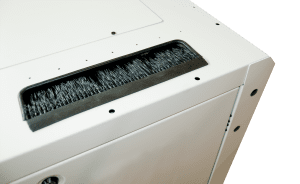
Looking for a top punchout brush grommel for my Startech server rack.

Hey All,

I bought a Startech server rack that has a top punchout panel for cable management. Unfortunately it's just raw metal around the edges and I don't want to damage the cables I pull through there so I was looking for a brush grommel like the one I have linked in this post. The one I found isn't for the rack I have but it's an example of what I'm looking for. I've seen a lot of horizontal, 1U panels to put in but I'm specifically looking for something to go around an already existing hole, vertically, in the top of the rack.

Does anyone know of any universal kits I could get? Something I could cut to length?

Or do you have different solutions for how you protect your cables like I need? I was thinking a real hack solution could be to just wrap some dead cable in electrical tape and tape it around the edge of the punchout hole but I wanted to see if there was a more official grommel solution of some kind.

Thanks!

Looking for a top punchout brush grommel for my Startech server rack.https://www.server-rack-online.com/bgt/Open linkView original on lemmy.world

Network topology and some questions.

Hey all,

I have some questions and this community has been great with my other ones, I'm hoping you can help me out with these too.

This is the diagram of how I think I want my physical network laid out.

Hardware:

The patch panel has LAN cables I installed in the walls on ports 1-20. The ISP feed comes into the patch panel on port 21.

I was looking at getting a Cisco CBS-220 but I found out that those are EOS/EOL and the Catalyst 1200/1300 replaces them. Also that the C1200/1300's aren't actual Catalyst switches but that's beside the point. I couldn't find exact stencils for the C1300 but just know the Catalyst in the picture is supposed to be a 48 port C1300 with 10G SFP+ ports on the right side.

The Netgate is an 8200. According to Netgate's specs, the 8200 LAN ports operate at 2.5G and if I wanted faster, I'd have to upgrade to the 8300 plus some expansion cards. No need for that.

Questions:

  1. Does this diagram make sense? I want everything in my LAN to be protected and controlled by the Netgate. By connecting the switch to the LAN port of the Netgate and then the WAN of the Netgate to the internet feed, I feel like that accomplishes that goal.

  2. Can the C1300 be connected like this? I would need to get a 10G SFP+ for ethernet, not fibre, which I haven't looked for yet. I know with fiber you have to be careful to match both sides of the connection with the same speed otherwise they won't work. Does the same hold true for ethernet SFP's? Meaning, if I find a 10G ethernet SFP+ (since that's what the Catalyst port is rated for) and plug it into a cable going to the 2.5G LAN port on the Netgate, will they communicate properly?

View original on lemmy.world

Do I understand UPS power correctly?

Hey all,

Building out my lab, I was going to get a rackmount UPS. The one I'm looking at is a Cyberpower OR1500LCDRM1U. It says it offers:

1500 VA, 900 W, 120 V

Do I understand correctly that all I need to do is find the Wattage rating for each of the components I want to plug in and add them up? My components right now are pretty light, only about 120 watts total. But soon I'm going to expand and build out a Nutanix CE cluster with 3 nodes and a rack of drives. I was looking at using some NUCs but they are each rated at 330W.

So that would mean even the NUCs by themselves would over-provision the UPS right? Then on top of that I would still need all the other equipment in the rack to be powered.

Am I understanding this correctly or is there something I'm missing?

View original on lemmy.world

Choice between Cisco Catalyst 1200 and Cisco Business 220?

Hey everyone,

I'm back with another question. I'm looking at switches and have it narrowed down to two options:

Cisco Catalyst 1200-24T-4X

Cisco Business CBS220-24T-4X

I'm going to have a Netgate as my main router in the house but I am also going to have a dev environment that I don't necessarily want interacting with my regular network. Originally I was thinking of just getting an unmanaged switch but I might like having some light VLAN capabilities of a managed switch that I can have the option of using.

I don't have any use right now for PoE devices so I don't need the switch to do that. I'm having a hard time figuring out exactly what the differences are between the CBS model and the Catalyst model.

It's a difference of about $45. As far as I can tell, the main benefit to the Catalyst is Cisco's Cloud dashboard. I don't need or want that. I'll handle everything through a VPN connection back to the house and honestly, I don't see myself needing to interface with the switch much after I get it set up. If the cloud dashboard is the only difference then I'll just save the $45 and get the CBS model.

But I wanted to ask you all if there's something else I'm missing that might make the Catalyst a better choice?

Thanks!--

View original on lemmy.world

What planning tool do you use?

Hey all,

I'm looking to build a small half rack server set in my house and was wondering if there were any tools that let me build out a solution? I'm worried I'm going to forget something and just wanted it all listed out as I think of things.

Yeah I can probably build it out and keep track of it in Obsidian or Excel or something, I was just curious if there were server builder tools like there are PC builder tools?

I mainly want to make sure I get a rack big enough for the few pieces I want to put in it as well as I want to try to calculate the power draw and BTU output which I imagine will be pretty minimal. I just would like hard numbers to know for sure.

Thanks!

View original on lemmy.world

[Help] Can't install MongoDB on RHEL 9 due to libssl, libcrypto, and GPG issues.

Hello all,

I'm deploying an Amazon EC2 instance of RHEL and attempting to install MongoDB via yum.

Following the guide provided by MongoDB, if I place only the repo file for either mongodb 7 or 8, the install fails. If I place both repo files, it still fails.

If only 7's repo file is present, it fails with 7's GPG key.

MongoDB Repository                                                                      434  B/s | 1.6 kB     00:03
Importing GPG key 0x1785BA38:
 Userid     : ""
 Fingerprint: E588 3020 1F7D D82C D808 AA84 160D 26BB 1785 BA38
 From       : https://pgp.mongodb.com/server-7.0.asc
error: Certificate 160D26BB1785BA38:
  Policy rejects 160D26BB1785BA38: No binding signature at time 2025-05-28T14:23:03Z
Key import failed (code 2). Failing package is: mongodb-database-tools-100.12.1-1.x86_64
 GPG Keys are configured as: https://pgp.mongodb.com/server-7.0.asc
Public key for mongodb-mongosh-2.5.1.x86_64.rpm is not installed. Failing package is: mongodb-mongosh-2.5.1-1.el8.x86_64
 GPG Keys are configured as: https://pgp.mongodb.com/server-7.0.asc
Public key for mongodb-org-mongos-7.0.20-1.el9.x86_64.rpm is not installed. Failing package is: mongodb-org-mongos-7.0.20-1.el9.x86_64
 GPG Keys are configured as: https://pgp.mongodb.com/server-7.0.asc
Public key for mongodb-org-server-7.0.20-1.el9.x86_64.rpm is not installed. Failing package is: mongodb-org-server-7.0.20-1.el9.x86_64
 GPG Keys are configured as: https://pgp.mongodb.com/server-7.0.asc
The downloaded packages were saved in cache until the next successful transaction.
You can remove cached packages by executing 'yum clean packages'.
Error: GPG check FAILED

If only 8's repo file is present, it fails with libssl and libcrypto errors:

Excerpt:

[...]
 - cannot install the best candidate for the job
  - nothing provides libcrypto.so.1.1()(64bit) needed by mongodb-org-server-8.0.0-1.el8.x86_64 from mongodb-org-8.0
  - nothing provides libcrypto.so.1.1(OPENSSL_1_1_0)(64bit) needed by mongodb-org-server-8.0.0-1.el8.x86_64 from mongodb-org-8.0
[...]

If both 7 and 8's repo file is present, it fails on 7's GPG key again.

I've tried manually importing both 7 and 8's GPG keys with:

rpm --import "https://pgp.mongodb.com/server-8.0.asc"

and

rpm --import "https://pgp.mongodb.com/server-7.0.asc"

The 8 import seems to work but the 7 import fails.

The thing is, last week, I successfully installed MongoDB on RHEL 9 using these exact same steps. I'm just doing it again now to capture documentation for work and it's failing.

So my questions are: What the hell?

Seriously though, what can I do to fix this? Is this a problem with MongoDB? Do they need to update their keys?

Thanks

View original on lemmy.world

You reached the end