Spyke
ergomechkeyboards·ErgoMechKeyboardsbyudc

TAIKO-01 Keyboard Kickstarter Ends July 1 [vendor]

Hey everyone,

Just wanted to give a quick heads-up for anyone who might have missed it, there are only 7 days left on the Kickstarter campaign for the TAIKO-01 keyboard!

If you haven’t seen it yet, there's some background here: https://lemmy.world/post/47465897.

You can find the campaign and all the details here:

Kickstarter: https://www.kickstarter.com/projects/taikohub/taiko-01-keyboard

Official Site: https://taiko.taikohub.com/

What do you guys think of the layout and design? Anyone here already backed it?

View original on lemmy.world
ergomechkeyboards·ErgoMechKeyboardsbySatyrSack

Any recommendations for a prebuilt split unibody keyboard?

I want to buy a new keyboard. My use case for this particular keyboard will be as what you might consider a tertiary keyboard. I do not need a new primary keyboard that I spend most of my time with on my main computer. I also do not need a new secondary keyboard to keep at my other workstation that I interact with often when not using my primary workstation. What I need is a keyboard that will be my go-to for miscellaneous tasks. When I need to plug into some server temporarily, I want to use this keyboard. When I need to set up a new computer that will later be used by another user with a "normal" keyboard, I want to use this keyboard. Currently, I use a basic office keyboard for this task. I can move it from computer to computer, and it works reliably for these occasional miscellaneous tasks. But after having switched to using split ergo as my primary/secondary keyboards, using this traditional keyboard even occasionally does feel off. If I can, I would like a split ergo that can fill this use case.

This means I want a few specifications that are not common for split ergonomic keyboards:

  • Unibody. I will often not be using this keyboard at a desk or other optimal position. As such, having two halves to the keyboard can be cumbersome. I might be just resting the keyboard on my knee or something for a few minutes while I type on it. For this purpose, it would be simpler to have a keyboard that is just one single unit with one single cable.
  • 100%. Most split ergos have just a few dozen keys. This makes sense for a keyboard that I am going to use often and can memorize the layout and all the various layers. But this is a keyboard that I plan to only use occasionally. As such, I want to be able to look at the keys to hunt/peck if I need. I do not want to have to remember what sequence of keys is used to press Alt+F4. I want to look at the keyboard, find the key that is labelled Alt, find the key that is labelled F4, and press those two keys.

There are also a few other relevant specs that it seems are very common, but I wanted to mention them anyway:

  • USB C. Preferably, a detachable USB C cable. I do not mind if the keyboard also has Bluetooth/2.4GHz. That will not be a problem if it has the feature, I will just almost certainly never use it. With that said, not needing a battery generally has a list of pros (smaller, lighter, cheaper, etc.).
  • Ortholinear. The big thing that I am trying to get away from here with my current keyboard is its staggered key layout.
  • Swappable caps. I want to be able to have this keyboard clearly labelled in Colemak layout.
  • VIA compatible. At the very least, I should be able to reprogram keys somehow. QMK, ZMK, whatever.

Can you think of any suggestions of a good keyboard that fits these requirements? I came across a few that seem like they might fit:

Kinesis Advantage2

$399

https://kinesis-ergo.com/keyboards/advantage2-keyboard/

Truly Ergonomic CLEAVE

$299

https://trulyergonomic.com/mechanical-keyboards/products/cleave-truly-ergonomic-mechanical-switch-keyboard/

Hazel Cut Slope

https://shop.hazel.cc/products/cut-slope

ErgoHaven Planeta

https://ergohaven.xyz/shop/tproduct/339856256-880659810681-planeta

View original on quokk.au
ergomechkeyboards·ErgoMechKeyboardsbyudc

TAIKO 01 Keyboard - Launches Tuesday (June 2)

Hey all,

Some of you have seen me post here before. For those who haven't, I'm David, I'm a Canadian primary care doctor, worked in chronic pain, and I built a split ergonomic keyboard. It's called the TAIKO-01 and it launches on Kickstarter on Tuesday (June 2).

For those who do know about this, yes it's finally actually happening 😭. Appreciate everyone who stuck around.

The TL;DR is 5 years ago I got carpal tunnel and wrist tendinosis, built one for myself, serendipitously ended up selling dactyl-like variations to a lot of people over the years, took the feedback I got then created this based off it, quit my job to work on this, found out the hard way that injection mold designs are way more complicated than 3D printed designs, ended up working on this for a whole year.

Details:

Switches: Gateron browns. 4 switches are 1.5u in size and 56 are 1u in size.

Keycaps: Laser-etched ABS XDA profile keycaps

Connectivity: Wired USB

OS Compatibility: Linux, macOS, Windows

Firmware Compatibility: QMK, Vial, VIA

Keycap Compatibility: XDA, DSA, MOA, SA Row 3 and MA

Keyswitch Compatibility: All MX-style keyswitches

Prelaunch waitlist here is still open until Monday if you want the early backer price.

Happy to answer any questions.

*It is NOT wireless

View original on lemmy.world
ergomechkeyboards·ErgoMechKeyboardsbyShutUpWesley

How to improve battery life on the "central" side

A few months back I build a wireless Lily58 to replace my wired Lily. And while for the most part I love it, I have noticed that the left "central" half drains it's battery 2-3x faster than the peripheral half(typically in less than 72 hours. This has lead to me keeping it plugged in most the of the time.

I have read that getting a dedicated dongle can help improve this, and I'll definitely look into that, but I was wondering if there was any modifications that may improve the lifespan.

Details:
The board is from typeractive, with the Nice!Nano v2 and Nice!display, as well as the batteries typeractive ships.

View original on piefed.zip
ergomechkeyboards·ErgoMechKeyboardsbymoseschrute

Looking for a portable keyboard similar to the advantage 360

I absolutely love my kinesis advantage 360. So much so, that I wanna find a similar portable keyboard that I can bring with me in a backpack. I’m looking for split keyboards that has a similar key layout and similar size thumb cluster.

The Halcyon Elora looks promising. Any other recommendations? This will be mostly for coding if you need an idea of what keys are import to me. And I use vim (bwt) if that context helps too lol.

View original on lemmy.world
ergomechkeyboards·ErgoMechKeyboardsbyudc

TAIKO-01 Ergonomic Split Keyboard [2026 April Update]

Hey all, My name is David. I'm a Canadian primary care doctor who used to have a chronic pain practice. I built a concave split ergonomic keyboard I'm launching June 2nd. You can find it at taiko.taikohub.com. If you sign up for the waitlist now, you can get a discount on top of the promotional launch price.

I posted on here maybe like 4-5 months ago about my progress with the TAIKO-01 if you're thinking this sounds familiar.

1. How this keybord started

A bit about me. I developed carpal tunnel syndrome and wrist tendinosis back in 2020, tried a bunch of things like physio, wrist brace, etc that helped but didn't fix my problems. I ended up looking into workplace ergonomics and made my own split dactyl-like keyboard. By sheer coincidence, I ended up making keyboards for people for the past 4 years. I've talked to a ton of awesome users over those years, made a ton of iterations. I quit my job this year to create the TAIKO-01 based on their feedback.

2. Updates for the last 4-5 months

Since the last update 4-5 months ago, I did a full redesign of the keyboard. This was to optimize design for manufacturability. But now it's finally done, so everything is ready for injection molding. Since I've been doing this for years, you wouldn't think it'd take this long. But it ended up taking an entire year 😱. It's humbling how hard it is going from 3D printing to injection molding.

3. What's special about this keyboard

You might've seen split concave keyboards like Kinesis Advantage, Glove80. Here's how the TAIKO-01 is different:

  1. It's more compact, which makes it easier to transport.
  2. It has a thumb cluster that's easier to reach because it's oriented at a downward angle. This lets you use thumb abduction instead of thumb extension, clarified by this diagram. Thumb abduction is much more ergonomic than thumb extension, which is what happens with Kinesis Advantage, Moonlander and Glove80. This is because thumb abduction puts you in a handshake position.
  3. Layer keys (LOWER and RAISE) are offset at a lower height compared to other keys on the thumb cluster so you won't accidentally hit it. Note that layer keys let you toggle or temporarily switch to a different keyboard layout.
  4. It's hotswappable. It's also QMK compatible.
  5. If you want to see a side by side comparison with the Kinesis Advantage, I made a quick video here: https://youtube.com/shorts/GId4orK1fn0

4. The ultimate goal

But it's one thing to be confident from anecdotal evidence and another to be confident from clinical evidence. The goal is to save enough from sales to do a clinical study so we know how split concave keyboards helps people and what exactly it helps with (carpal tunnel, wrist tendinosis, de Quervains, epicondylitis, etc). From user feedback (n>120), there seems to be strong feedback it helps people with their wrist/hand/elbow pain. It's just what exactly it helps and under what circumstances it helps (used with standing desk, augmented with physio, etc) is muddled.

If you're interested, please check out taiko.taikohub.com.

View original on lemmy.world
ergomechkeyboards·ErgoMechKeyboardsbyedantusi

[Show Lemmy] I got tired of TRRS cables, so I built a 420g CNC aluminum, truly wireless split keyboard

Hey Fediverse,

I’ve been a long-time fan of split keyboards, but I always hated two things: the annoying bridge cables (TRRS) between the halves, and the bulky 3D-printed/acrylic cases if you wanted to go wireless.

I wanted a clean, zero-cable desk setup but with the premium feel of a custom CNC mechanical board. So, I spent the last few months developing this project: Elytra.

Here are the specs I managed to hit:

100% Truly Wireless: Powered by ZMK. No wires to the PC, no wires between the halves.

Ultralight CNC Aluminum: To keep it travel-friendly, we applied a biomimetic cutout design on the underside. The whole full-metal chassis weighs only 420g (0.93 lbs).

Low Profile: Designed for better posture without needing massive wrist rests.

I just got the website up and running for early pre-orders: https://elimkeys.com/

I'm currently working with my manufacturing partner to refine the hardware tolerances and tweaking the ZMK firmware. Since this community knows ergonomic boards better than anyone, I would absolutely love your raw feedback on the layout, design, or any questions about the manufacturing process.

Cheers!

View original on lemmy.world
ergomechkeyboards·ErgoMechKeyboardsbySatyrSack

Blacked out Charybdis

Blacked out Charybdis

Specs

  • Charybdis MK2 by Bastard Keyboards
  • Case: Prusament Galaxy Black PLA
  • Switches: MX Linear (Gateron yellow)
  • Keycaps: Ducky Blank Black MDA Profile Singleshot PBT
  • Trackball: SANWA 34mm/1.34in Black
  • Bearings: MR63 roller bearings
  • TRRS cable: UGREEN 3.5mm Braided 4-Pole TRRS Hi-Fi Stereo Jack Shielded Male to Male AUX Cord

Thoughts

The two main features that attracted me to the Charybdis were its curved keywell and integrated trackball. But while the trackball is very useful compared to using a separate standalone trackball device, I definitely understand why people often dislike thumb-operated trackballs like this. The way the Charybdis is designed to be used is with the fingers in the home row position and thumbs alternating between the thumb cluster keys and operating the trackball as needed. The problem there is that during long sessions of a pointer-heavy task, operating this trackball with my thumb as designed makes my right forearm sore. For whatever biomechanical reason, operating a trackball with my fingers is just much more comfortable than doing so with my thumb. I can mitigate this issue on the Charybdis a bit by simply adjusting my hand position on the keyboard only during pointer-heavy tasks.

When it comes to key-heavy tasks (e.g. writing code, drafting email), I use the keyboard as designed, like the mock-up above. Of course, during these key-heavy tasks, I do occasionally need to make a small movement with the trackball, so I can just move my thumb over onto the trackball as needed. For small occasional pointer adjustments like this, operating the trackball with my thumb is no problem.

But during pointer-heavy tasks (e.g. photo editing, web browsing), I move my right hand down so that my middle finger now rests on the trackball and my index finger and thumb operate the thumb cluster, like the mock-up above. When in this position, my left hand handles all the clicking, modifier keys (control, shift, etc.), and most of the occasional alpha keys that I need to press. Just like how I occasionally need to make small pointer adjustments during a key-heavy task, I do occasionally need to briefly adjust my hand into the normal home row typing position during pointer-heavy tasks.

This concept of moving my right hand between these two positions is still much better than the more traditional method of moving my hand between a keyboard and separate mouse/trackball. With a separate mouse/trackball, I have to move my entire arm several centimeters to the side each time I want to go between pointing/typing. But with the Charybdis, alternating between my two different hand positions is just a matter of moving my fingers down a couple of centimeters. This takes less time, and more importantly, less effort.

::: spoiler Off-topic Svalboard comparison
All this said, it pales in comparison to the pointing/typing experience of a Svalboard Lightly. Like the Charybdis, the Svalboard puts its trackball right next to the keys. But not only can the Svalboard trackball be positioned even closer to its keys than the Charybdis trackball is to its keys, the Svalboard has a trackball on both hands. Having one trackball that is dedicated to pointing and a second trackball that is dedicated to scrolling (both vertically and horizontally) is a better experience than the method that the Charybdis employs of using a key to toggle the single trackball between pointing/scrolling.


:::

View original on quokk.au
ergomechkeyboards·ErgoMechKeyboardsbyTiuku

Arrow key bindings

How do you like to bind your arrow keys, and why?

Ergo boards don't typically have dedicated arrow clusters, so we're left to bind them on some alternate layers one way or another.

Here are two prevalent layouts, along with some initial thoughts:

Homerow

Binding them linearly to a homerow on some layer.

Pros

  • Arrows directly underneath your fingertips

Cons

  • Less intuitive
  • Pinky may be weaker when going right repeatedly

Pyramid

Bind arrows in a traditional pyramid shape, likely based on a homerow as well.

Pros

  • Familiar layout
  • Extra key available for pinky, e.g. a tab might be handy

Cons

  • Finger movement required for up arrow
  • Takes space on the row above, which might matter if you'd like to have a full row of other things there

Post pic is original art by the author, public domain, commission queue is already full.

View original on sopuli.xyz
ergomechkeyboards·ErgoMechKeyboardsbyYoddel_Hickory

Corne with solar and Magsafe

Started having some pain after days of work + evenings of gaming, so I decided to get an ergonomic keyboard.

  • Board: Corne Choc wireless from Typeractive
  • Switches: Ambients Silent Choc Switches 20 g linear Nocturnal from lowprokb
  • Keycaps: MBK Low Profile PBT from lowprokb
  • Controllers: Supermini NRF52840 from Aliexpress
  • Tenting: Magsafe metal rings and phone holders from Aliexpress
  • Solar panels: Ixolar panels that are nearly the exact same size as the keyboard controllers from Digikey
  • Solar harverters: Solar harvester for Li-ion batteries on Tindie

It tents:

It sticks together:

All thanks to Magsafe rings and small magnets on the bottom:

And if I ever want to Switch up the color scheme:

View original on piefed.ca
ergomechkeyboards·ErgoMechKeyboardsbySatyrSack

Upgraded my Svalboard with BTUs

This is an expensive, but worthwhile upgrade. The trackballs now move incredibly smoothly with negligible static friction (stiction). All that this upgrade required was six Bosch ball transfer units (BTUs), two 3D printed trackball holders, two static bearings, and a bit of glue. It is definitely louder than the stock configuration with only static bearings, but not as bad I had been expecting based on comments I had read online. As mentioned, it was rather expensive, costing me about 100€ after shipping for the six BTUs alone. But reading comments from other users who have done similar upgrades, it is well worth the extra cost (over cheaper BTU models) for something that you use daily. Printing the trackball holders (which were modeled by a fellow user) was also extremely simple. Printing certain Svalboard components requires a tightly calibrated printer, but the trackball holders do not. I was able to print these after dusting off an Ender 3 that has been sitting unused on a shelf for a couple years.


  • BTU used: Bosch Rexroth R053010810 Ball Transfer Unit Ball Transfer Unit Ku-B8-Ofk
  • Public Onshape repo for the trackball holder 3D model: Svalboard Open Trackball BTU HACKING - PMW3360/3389 - 2025-09-10
  • Stabilizer bearing: 1/8-inch Ceramic Bearing Balls ZrO2 Zirconium Oxide Ball G5
View original on quokk.au
ergomechkeyboards·ErgoMechKeyboardsbyluckybipedal

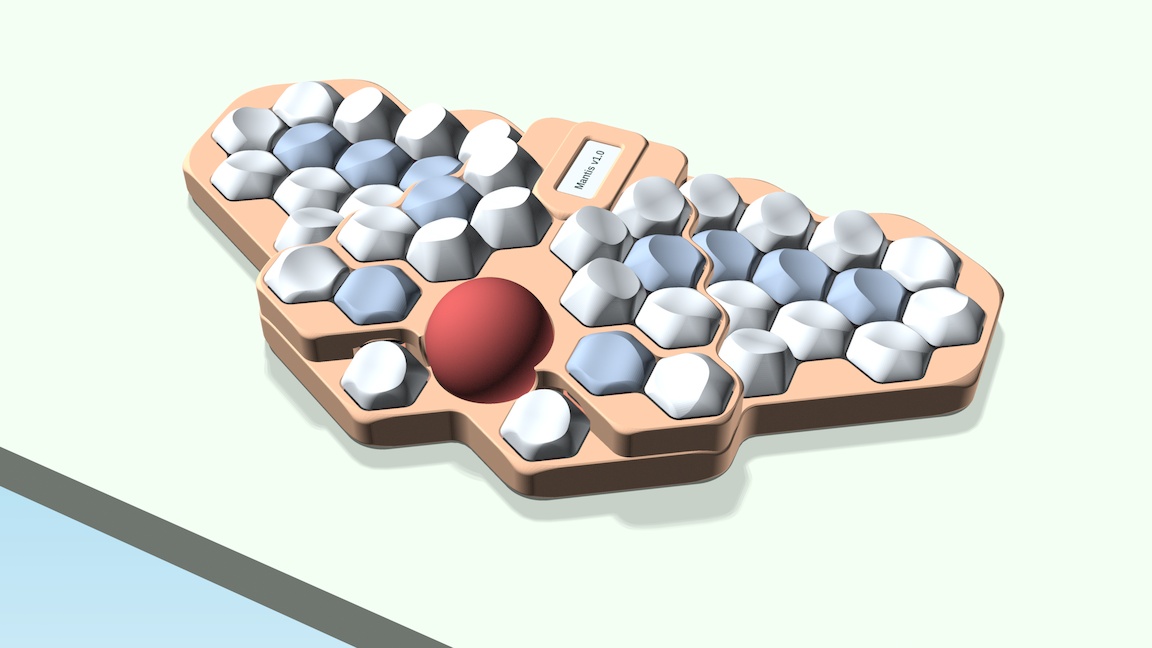
Mantis v1.0 development update

After working on it for more than a year, I'm starting to see the finish line of this project. So it seemed like a good time to share an update and some renders on my GitHub development branch. If I don't hit any major snags, I expect to build the first prototypes in March or April and publish the final design and a build guide later this spring.

Mantis v1.0 development updatehttps://github.com/fxkuehl/mantis/blob/devel/README.mdOpen linkView original on lemmy.world
ergomechkeyboards·ErgoMechKeyboardsbyJAWNEHBOY

ergo thumb cluster laptop deck for framework?

Curious if anyone else has reached out to frame.work about the idea for a more ergonomic option on the keyboard & touchpad deck? I really hate switching to standard QWERTY on my surface device provided by work, and I'd be very interested in a better option.

They already offer some international options with more keys on the 13, so I don't see why a modified layout would pose any further challenge. Let alone on the 16 with the modular deck

View original on reddthat.com
ergomechkeyboards·ErgoMechKeyboardsbyudc

Introducing the TAIKO-01 Keyboard

Just wanted to share a render for a keyboard I'm making. It's coming end of this year. I didn't show it in the pictures, but it would have legends on the keycaps. I've used dactyls and dactyl-likes before and I've always wanted one that feels solid with high quality injection molded cases instead of the 3D printed ones.

Join the waitlist here: https://taiko.taikohub.com/

Our discord is here: https://discord.gg/ByZyyZDb

Materials: Injection molded ASA plastic.

Target price: ~$350.

Wired/Wireless: The product would come wired. Wireless module to come afterwards.

Hotswappable

View original on lemmy.world