
Spyke

Posts

ergomechkeyboards·ErgoMechKeyboardsbyluckybipedal

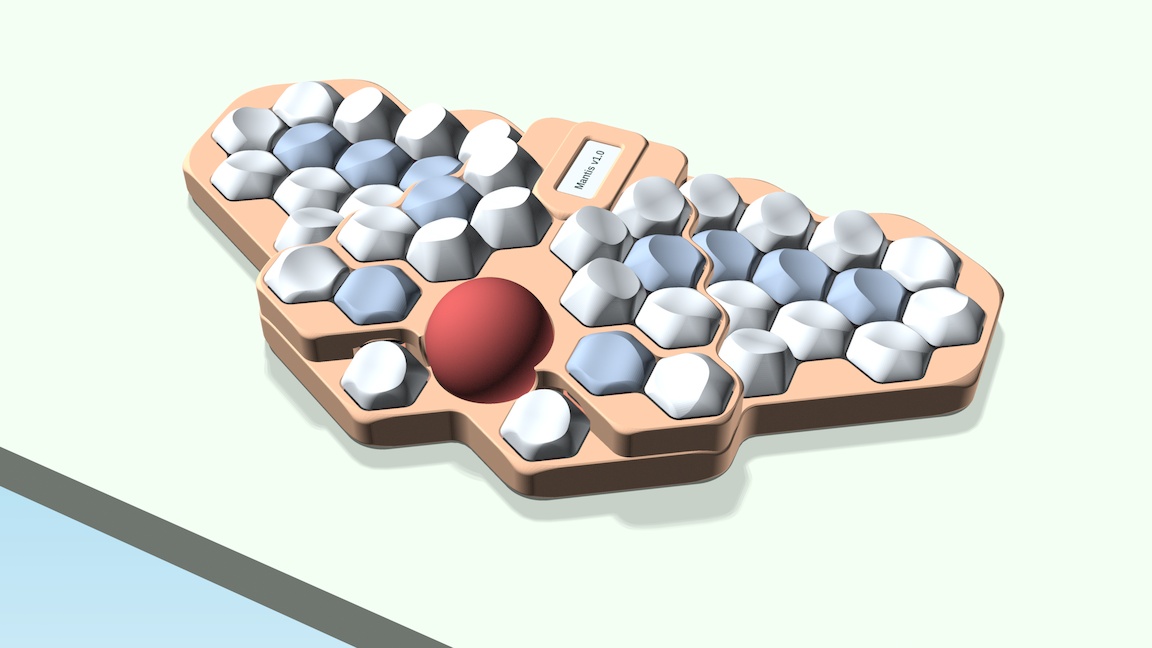
[vendor] Mantis v1.0 update from the Canadian Mechanical Keyboard Meetup

It's finally happening. The Mantis v1.0 prototypes are coming together and have been in daily use since mid-June. I proved all the PCB features for wired builds with RP2040-based controllers and per-key RGB, as well as wireless ones with nice!nano controller and a nice!view display. Both variants use a PMW-3610 trackball sensor on a custom sensor PCB with a VIK-compatible interface and run ZMK. To make the sensor work with RP2040 controllers I needed to dig pretty deep into Zephyr and I'm working on contributing the patches to the Zephyr project.

On July 11 I showed off my new prototypes as well as the previous versions of Mantis at the Canadian Mechanical Keyboard Meetup to some fellow keyboard nerds in person. The reactions were overwhelmingly positive.

Already earlier this spring I had decided to start a company (HEXergoN Inc.) to make Mantis kits and keyboards more easily accessible. My friend Ambika is joining me as co-founder, who is handling a lot of the administration, website, social media, supplier relationships and eventually customer relationships so that I can focus on the technical and design side of it. We are now officially out of stealth mode and we expect to be ready to launch in the fall of this year with a first limited production run.

A lot of work remains to address some more mechanical and fit issues with the trackball bearings and gasket mounting system, make the case easier to print with FDM printers, streamline the build process, design packaging, and establish a supply chain.

You can follow us on our website, hexergon.ca. I'll keep the blog there updated as we get closer to launch and may post here occasionally. I'll be happy to answer your questions in the comments below.

View original on lemmy.world
66
ergomechkeyboards·ErgoMechKeyboardsbyluckybipedal

Mantis v1.0 development update

After working on it for more than a year, I'm starting to see the finish line of this project. So it seemed like a good time to share an update and some renders on my GitHub development branch. If I don't hit any major snags, I expect to build the first prototypes in March or April and publish the final design and a build guide later this spring.

Mantis v1.0 development updatehttps://github.com/fxkuehl/mantis/blob/devel/README.mdOpen linkView original on lemmy.world
20
ergomechkeyboards·ErgoMechKeyboardsbyluckybipedal

Introducing Kühlmak, my layout analyzer and optimizer

After a few years of tinkering and learning I'm finally ready to share the result of my work. Meet Kühlmak. What started out as my attempt to create the perfect keyboard layout morphed into a project to make a flexible and fast analyzer and optimizer. The feature highlights:

  • Command line interface
  • Information-rich, text-based layout overview and stats
  • Support for different types of physical keyboard layouts and fingerings (row-staggered, angle-mod, column-staggered and more)
  • Extremely fast analyzer that enables simulated annealing
  • Multi-threaded annealing to find many optimized layouts quickly
  • Multi-objective fitness function with soft targets for individual objectives
  • Multi-objective ranking system to identify the best trade-offs out of many generated layouts
  • Metrics that naturally favour finger and/or hand balance for effort, travel and n-grams
  • Finger travel distance weighted by speed (inspired by Semimak)
  • Comprehensive same-hand bigram, disjointed-bigram and same-hand 3-gram scoring system
  • Support for affinity of Space to one thumb or both
  • Optional constraints to enable steering certain layout features (e.g. preferred positions of punctuations and shortcuts)

The terminology and metrics are partially inspired by and partially adapted to The Keyboard Layouts Doc (2nd edition). However, I made some deliberate design choices and probably introduced more subtle biases that deviate from some of those definitions. There is lots more information in the README.

At this point I consider it ready enough to finally optimize a layout for my Mantis keyboard and see if it works as well as I hope it will.

Introducing Kühlmak, my layout analyzer and optimizerhttps://github.com/fxkuehl/kuehlmakOpen linkView original on lemmy.world
44
ergomechkeyboards·ErgoMechKeyboardsbyluckybipedal

Mantis v0.3.3 Update

I've been busy building a few Mantis v0.3.3 builds for friends and family. It took me way longer to build these than I had planned, and I still have a few more builds to go before I work on the next version of the design. But I'm getting better at this, and very happy with how these turned out. It's nice to try out different switches. On these boards I used Choc Sunset, Pro Red and Pink switches. They all work great with the sculpted key caps.

The two keyboards in the front use clear acrylic case plates and key caps made of two different resin materials to highlight the home keys. They are translucent enough for the backlight. The one in the back is made with birch plywood plates, painted with 3 coats of shellac to bring out the wood grain and lightly sanded for a matte finish. The key caps are grey nylon. The small holes in the skirts work great for letting the backlight shine through those opaque keys.

I used KB2040 controllers from Adafruit for all these builds and loving the extra space for building the firmware with Vial support. My old v0.3 prototype with a ProMicro also works with Vial, but I had to disable some features and lighting effects to squeeze it in.

View original on lemmy.world
63
ergomechkeyboards·ErgoMechKeyboardsbyluckybipedal

Updated keycaps for Mantis v0.3

I updated the 3D-printed keycaps for my Mantis v0.3 keyboard to create more sculpted keywells that require less finger movement for typing.

Thanks to the rotation of the switches on the PCB, this needs only two different keycap profiles, a flat one with 15° tilt of the dish, very similar to the keycaps I had printed for the first prototype, and a tall one with 28° tilt.

The flat keys are used on the home row, the outer pinky key and most thumb keys. The tall ones are used on the remaining keys. I'm not quite happy with the rotation of the inner index finger keys with the taller key profile. Fixing that will require a revision of the PCB, if I want to keep the number of distinct key profiles to just two.

I was able to print these keys very cost-effectively at JLCPCB, by joining 10 keys in a single 3D object. For the flat keys it brings the cost down to 30 cents per key. This leads to more imperfections than printing individual keys, but they are mostly cosmetic and don't affect the usability. The savings are worth it for me to make several prototype keyboards cost effectively.

The updated 3D models, including 10-key versions are on GitHub.

View original on lemmy.world
111
ergomechkeyboards·ErgoMechKeyboardsbyluckybipedal

Mantis v0.3 hatched

I teased Mantis v0.3 with two previous posts. I finally finished building it over the weekend and updated the QMK firmware including RGB Matrix support. I've been typing on it all day and it's a joy to use. The layout and keymap are mostly the same as what I had on v0.2 before.

Shout-out to PCBWay for sponsoring the manufacturing of the first batch of prototype PCBs and key caps. The acrylic case plates were made locally in Toronto at Hot Pop Factory.

The design and firmware are mostly up-to-date on GitHub (still need to finalize some minor tweaks to the case plates). Here are some more pictures.

I need to spend more time with the RGB Matrix features in QMK. For now I'm using the ALPHAS_MODS mode to highlight the home row and home thumb keys.

Here is the same perspective with the LEDs off, which makes it easier to see the curves of the key well. The key cap is my own design, 3D printed in resin by PCBWay. They came out great. I only needed to remove some small left overs of supports from the bottom where it interfered with the switch stem. No big deal, my thumb nail was the only tool needed. The stems feel very solid so I was not worried about swapping key caps on and off a few times during the fit and build process. The shape and dimensions are true to the design, so they fit pretty tightly to the switches and their neighbours. The surface of the spherical dish feels slightly textured, a bit like a PBT key cap. The little holes in the keys were meant to allow light to shine through. But the material turns out to be translucent, which is nice, so I'll have the next batch made without those holes.

The key caps are designed parametrically in OpenSCAD. I generated only a single key cap profile for this build. The key well shape comes from rotating the switches in 60° increments on different rows and thumb key positions, as well as the raised PCB for the index finger and most thumb keys. I built this one with Sunset (tactile) switches that I took off one of my v0.2 builds. They sound and feel good on this keyboard, but I'm going to build a second one with linear (Pro Red) switches for comparison.

The bottom view shows the reversible split bottom PCBs that make it slightly cheaper to manufacture in small batches. The fit is really good, with basically no gap between the PCBs and a perfect fit with the single-piece switch plate. I chose the more expensive purple solder mask for aesthetic reasons. It does look nice and I like the contrast with the white top PCB and key caps. Diodes and LEDs are surface-mounted from the bottom and sit inside the sound channels that meander under the switches of the two keyboard halves. I couldn't make this design work with hot-swap sockets, so the switches are committed to this keyboard now.

I'll do a sound comparison with and without the mid-layers that contain the sound channels at some point when I build the second prototype. Meanwhile I'll finish writing a build guide and do some more work on the firmware: add support for Vial and and play with the RGB features. Then I want to design a 3D printed version of the case, which would enable a simple one-stop shop way of ordering all the non-standard components from PCBWay or other PCB manufacturers that also offer 3D printing services. If that requires changes to the PCBs, it may turn into v0.4.

View original on lemmy.world
71
ergomechkeyboards·ErgoMechKeyboardsbyluckybipedal

Mantis v0.3 fit-check and sound-check

After receiving the PCBs and 3D printed key caps from PCBWay, I assembled everything with the case plates I picked up last week for a first fit-check and sound-check.

I'm really happy with how everything fits, feels and sounds. Thanks to PCBWay for sponsoring the PCB and key cap production for this prototype.

The next step is soldering all the electronics and finishing the firmware. If all goes well I'll post more pictures with RGB backlight in a few days.

https://imgur.com/gallery/WXwyt30Open linkView original on lemmy.world
27
ergomechkeyboards·ErgoMechKeyboardsbyluckybipedal

Mantis v0.3 parts are ordered

I'm excited to use my first post on Lemmy to share an update about the design and some renders of the next version of my Mantis keyboard. I ordered the PCBs, plates and 3D-printed key caps this week. I'm hoping to assemble the first prototype within the next two weeks.

Lots of firsts for me: 3D printing, laser cutting, RGB LEDs. I'm really hoping that I didn't make some big mistake that can't be fixed with a drill and some bodge wires ...

[edit: picture to save you a click and a length read]

https://github.com/fxkuehl/mantis/blob/main/design.mdOpen linkView original on lemmy.world
20

You reached the end