
GNOME 45's Nautilus File Manager Gets a Modern Full-Height Sidebar Layout
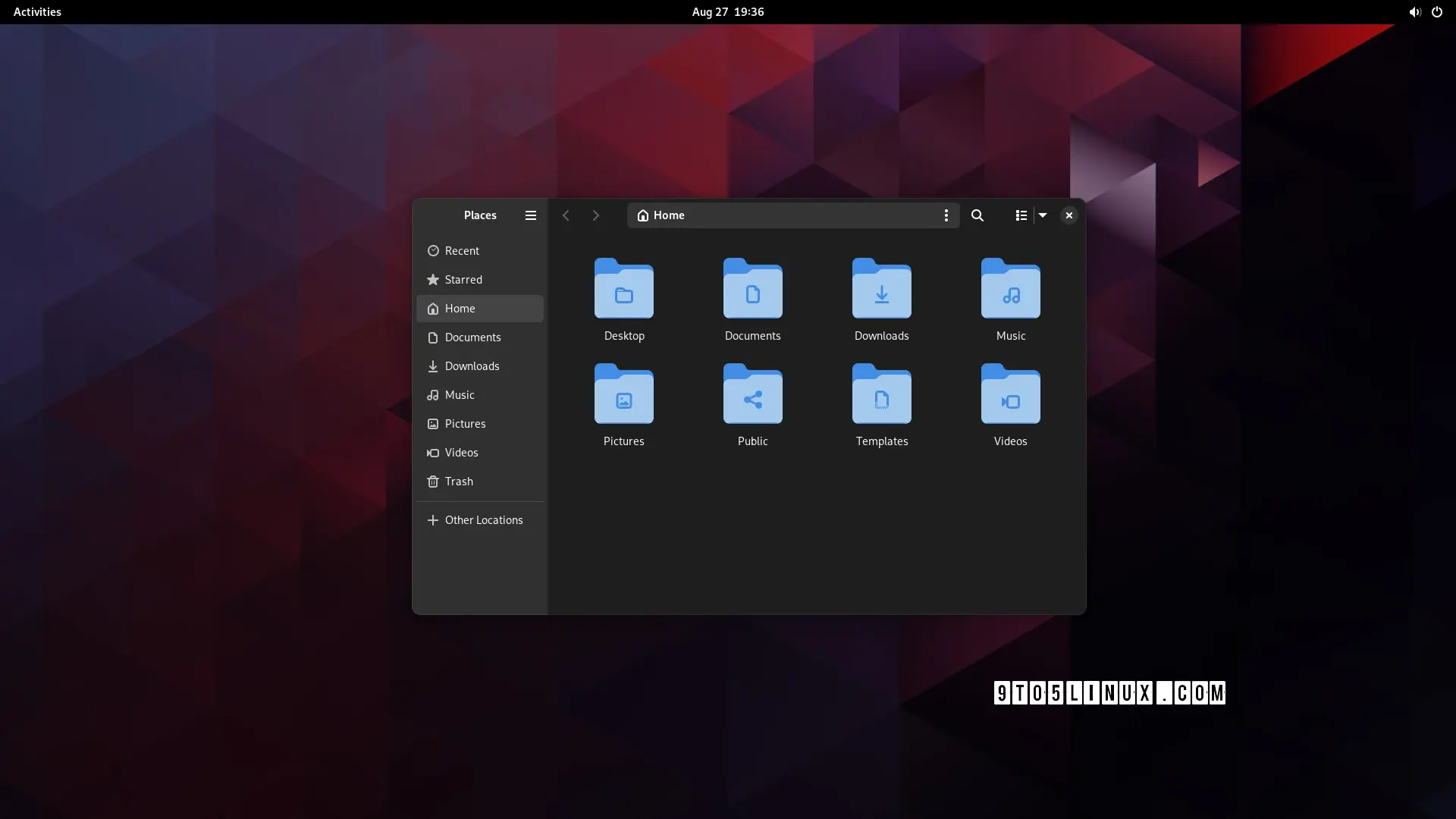 https://9to5linux.com/gnome-45s-nautilus-file-manager-gets-a-modern-full-height-sidebar-layoutOpen linkView original on lemmy.ml
Syndicated from the fediverse. Read and engage on the original instance.
View original on lemmy.mlhttps://9to5linux.com/gnome-45s-nautilus-file-manager-gets-a-modern-full-height-sidebar-layoutOpen linkView original on lemmy.ml
87 replies
who even decides what's "modern" anymore?
::: spoiler can anyone, honestly, without reading the article (or guessing from the headline), tell me which of these is the "modern" design?
edit: people are getting confused by the fact that one is tree view, not icons view so i changed the image. old image here :::
Apparently "modern" means hiding options behind extra clicks
i may be blind but what exactly was hidden behind one or more clicks?
Notice Min/Max buttons missing from window bar?
That's the default.
That’s nothing new though, that’s been Gnomes thing for over a decade
tbh not the best choice but that's just their design language I guess. what I was asking about tho was this post's redesign specifically
I think "modern" can be interpreted as nice and clean UI which is beautiful to watch and only the absolutely most important stuff is shown and the rest is hidden. So, like apple design approaches, I guess. Say form over function. Microsoft tends to go that route as well. Luckily for user who like function over form, there are different flavors of Linux.
Clearly the dark mode is the modern one! Jokes aside, I just realized that there THREE menu options on that toolbar: hamburger, kebab, and waffle! I realize they do different things, but no wonder people are confused by and scared of computers. Also, now I'm hungry!
TIL of kebab and waffle menus.
as someone who's not scared of computers, i have no idea what they do. i assume the right one is icons/list/compact1 not a waffle menu, but the hamburger and kebab? i have no clue
Footnotes
though why it's showing list when the current view is icons, i don't know either ↩
as a GNOME user I also don't get the hype lol
hey as long as it has thumbnail preview I will be hyped.
It's just my opinion (since it's not in the article) but a thing that makes Gnome and Libadwaita a "modern design" is the fact that the production behind it tries to bridge the gap between a "mouse and keyboard" and a "touch screen" workflow.
None of the other DEs come even close to Gnome when used on a tablet
Agreed, I'm not an expert, kind of new to linux, but I could see being very comfortable on a Gnome based tablet.
KDE is fantastic for tablets, I used it on my convertible ThinkPad for years
meh, subjectively i find that creates a "worst of both worlds" situation. but this comment was more about the futility of the development time that went into this specific feature
yeah sorry, I should have been more specific with my answer: features like this are supposed to help you in a touch screen situation or in general with smaller screens.
When the window is resized under a certain size, the left panel becomes hidden and with it part of the top bar, to make it less cluttered and confusing.
but ...surely you could just do the same thing with the old design? artist's rendition:
in fact, now i look at it, it makes them look even more similar once i collapse the sidebar
The difference is minimal, in the newer version you have 1 less element when the sidebar is collapsed (the hamburger menu).
Generally speaking Gnome 44 is already well optimized, 45 is going to be a more "tweaks and small improvements" kind of update rather than a big design changes
The first one doesn't waste space in the title bar by expanding the locator and navigator buttons there.
Petition to force anyone talking about software to use "trendy" or "fashionable" instead of "modern".
Full height sidebar - from Mac OS 7 or so - must be modern?
It'd be kinda nice if they made these kinds of changes options rather than just deciding this is best
Could honestly take it or leave it, doesn't really add anything
Adding options
Gnome desktop
Pick one.
i'm not even sure it's worth having an option. i don't think i'd even have noticed a difference, apart from the menu button being in a slightly different place to every other gnome app. it's fine; but it wasn't worth the development time
The last thing I want is an option for this. My gosh, imagine the amount of options you would end up with if every single design choice was turned into an option. Who in the world would like that many options.
I'm happy to just have a design team work on whatever they think looks better and works best for the user experience, and implement it after some rounds of public review and testing. This looks neat enough to me - slightly less cluttered than what my current Nautilus window looks like while maintaining the same functionality.
KDE fans?
Awww, Plasma fans, you know I'm playin'.
yep, that's me
Seriously, I envy you guys. Every time I try to use Plasma, I end up spending all my time tweaking the desktop, and by the time I'm done, I realize I've just recreated the Gnome workflow...
I tried KDE, it's cool but I get the same thing of trying to recreate gnome/pantheon
It kinda sucks in GNOME when there's just one thing you would like to change though
Have been trying to get a tiling window manager on GNOME but all the gnome extensions that do it kinda suck
every time i try to use gnome, i end up spending all my time going "dammit, where are all the bleeding features"
(also the lack of fitts' law adherence due to that pointless bar at the top)
Well I just switched to KDE Plasma last week and I'm pleasantly surprised just how many things are configurable via a menu and how well it runs on Wayland With a Nvidia GPU.
I used to despise KDE Neon, and used Gnome for a bit, but I don't think I can go back anymore until their design philosophy changes again.
I hope they stick to the design philosophy, having different choices in DE is a good thing.
Problem for me is KDE is dependant on configuration to get it to look nice, GNOME looks nice and works well out of the box but sucks if you want to do anything ontop of that base
"Modern" means copying Mac OS or iOS.
Honestly, I haven't yet seen the article, the light theme one is probably newer because of tabs.
Anyways both look like an android app, I know most will hate reading this but Windows Explorer rules.
nah, i agree with you. win explorer with qttabbar, tortoisegit, and some tweaks from winaerotweaker
dolphin is pretty good though and it has some features that explorer doesn't, like a terminal pane
The bottom one looks like a mobile app interface, so it must've been the "modern" one.
I'm very glad GNOME does such an amazing job staying modern in its look. GNU+Linux and free software would be much worse off without it.
Great. Now do split panel!
And column browse
I’d love a setting to change the default file manager. I always install Nemo and configure it to be the default but last I checked, it’s not a simple GUI setting like changing the default browser or email client or whatever. And then you end up with two programs called “Files,” which obviously isn’t ideal.
Would it be that much of a problem to have what app is “Files” be a simple setting? Maybe it’s way more complicated than one assumes.
My dream is that one day we will be able to assign default applications to the “generic” names in Gnome. Launch “Browser” and open Firefox (or chrome 🤢), Files and open Dolphin, Messages and open Elements etc etc.
Obviously I can do the same with custom .desktop files but it would be a nice flair to use the settings to just assign applications to those generic names.
You can set the default app in the settings though, right?
Maybe they added this when I wasn’t looking. It’s been awhile since I did a fresh install of a Gnome distro. (I use Fedora for work stuff and I’ve learned over the years to leave my work laptop the fuck alone and distro hop on a personal laptop.)
It's still a problem. And then once I finally set thunar as default, Firefox continues to open Nautilus. Removing Nautilus isn't an option either since it's a dependencie of something else.
I really hope choosing a default file manager woll be simple and always working at some point.
Yes and no. The setting affects the file manager, but things like "open/save file" dialogues will still use the Gnome file chooser, which is separate from Nautilus and not easily circumvented.
Most DEs do include the file manager in the default applications menu. You can also use xdg-mime to set it as the default for inode/directory
Until some app doesn't care about xdg-mime. At least I had some issues with firefox a while ago.
Firefox uses xdg-mime or xdg portals, depending on the configuration of the package. If you are using it as a flatpak, it will use portals.
Apps using portals will use the file picker your portal provides. This will usually be either the GNOME or Plasma file picker. Note that this file picker is separate from your default file manager.
It wasn't about the file picker but the file manager that opens after clicking the button to open the folder a downloaded file is saved in. It was indeed flatpak firefox iirc.
It did work at some point but broke again... At the moment it works I believe (at least I didn't get a call from my mom about the file manager being wrong again).
It wouldn't be that difficult, but it's definitely outside the realm of possibility with the current gnome team.
They have this 'our way is the best way' approach, which makes their jobs easier because they don't have to support different settings.
On my kids' pcs the default file manager is nemo and they use gnome, so it is possible
I don't like Nautilus and always srick with Nemo but the new look of many Gnome apps is really nice!
What's the advantage vs. the current version?
Also looks like it's removing an important visual affordance (i.e., which areas you can click to drag the window), unless I'm misinterpreting it
The current version has some problems with adaptivity, e.g. resizing the app window can cause issues. This led to the creation of new libadwaita widgets. If you want to read the technical details, see https://blogs.gnome.org/alicem/2023/06/15/rethinking-adaptivity/
The top bar has been full of buttons with no whitespace for a year or more now, that's not new (you can still drag the window using the whole bar, but it's definitely not intuitive and made me subconsciously do Win+drag to be safe many times).
This seems to be a relatively minor visual update to have the left sidebar fill the whole window -
maybe they want more space for shortcuts at a given window height?No clue.Edit: never mind, checked again and it's literally just a tiny visual update with no change to the actual content of the sidebar, but it takes some space away from the top bar.
i welcome merging two triple-dot menus into one, according to screenshots.
Thank you internet person, you have changed my life forever.
Yes. That is such a good feature. Before I knew this I don't know how I managed my windows
I use win+arrow key quite a lot too.
I absolutely love this shortcut, and have been using it for a little bit. Now I just wish there was one that would let me enter "resize" mode. The idea being that you hold a key down, and when you drag the window it'll resize from corner your cursor is closest to.
Some environments use super+rmb to do that. If yours doesn't, maybe see if it can be set as an option.
Ah! It appears while that isn't a default shortcut in GNOME, you can kinda get that by setting the
Resize Windowshortcut underKeyboard -> Shortcuts -> Windowmenu.It's a bit wonky if you want to resize it diagonally, as it moves the cursor to the center of the window, and then whichever is the first direction you drag the mouse is the edge it snaps to in order to start resizing. Works perfect for top/right/bottom/left, but if you try it diagonally then often it gets one of the other directions instead.
I will however have to remember that shortcut for when I'm on other DEs!
Try can enable resizing with Meta and Right Click in Gnome Tweaks, it doesn't cause to move cursor to the center of the window
Oh my god! Thank you!
I don't know how I've never seen this setting in Tweaks before, I thought I had looked over them all... That does exactly what I'm looking for!
Been a Gnome user for years and always glad to see them modernize the UI more, but the one thing I desperately want is .stl and/or .3mf thumbnailers to just work with Nautilus. Tried several times to set up in Fedora using f3d, but instead just get blurry question mark thumbnails
Please also remove the text places and make use of that space
Wow, revolutionary.
I kind of agree, it's nothing special, but the new window management they talked about sounds exciting actually. But thats far in the future.
Gotta keep up with Apple you know ahah
Only if they could copy the original Exposé from macOS Tiger.
I just want someone to finally copy column view from Finder. I know Ranger has it but it would be nice if Nautilus or Dolphin would implement it.
Looks nice, but if I could trade these visual gimmicks for a type-ahead feature, I would do so in a heartbeat.
gtk3-classicanyone?So glad KDE exists.
I don't get it... Does this tiny change ruin it for you?
Having to create .desktop files in god knows where for me to be able to right click -> "open with" my program of choice sure pushed me away
I don't even know what they were thinking not letting you beowse for any executable file on disk
Aren't you supposed to use
alacarteapp to create new program entry on gnome?That's definitely not what Google told me to do at the time in 2015
Yeah same. There are some types of text file where gedit doesn't even appear as an option. Like sometimes I don't want to open .xml files in the browser.
I was able to set VScode for .xml files but not gedit. It's not a huge deal but that one thing makes gnome feel like immature software.
I used GNOME for close to 20 years, but finally dropped it with the release 40. I've had enough of them breaking features.
By that time KDE finally stabilized and it does everything I want, my way.