They really want me to shift my gaming PC to Linux.
Gaming is the only reason it's still in windows 10.
But now? Ads? Full time spying? And they choose to do all this at a time when proton is making gaming on Linux easier than ever?
Okay then.
Heck. I'll gladly help my friends install Linux in their main device.
Hey government. This includes all your devices too.
I'm sure you'll be able to turn it off, and by some bug oversight it just hides everything but not actually turn it off.
Do something about it. Stop blindly trusting bigcorp to do the right thing. They've proven time and time again they WILL NOT.
Hey government. This includes all your devices too. I'm sure you'll be able to turn it off, and by some bug oversight it just hides everything but not actually turn it off.
My work computer upgraded to 11 last week and I'm sure I'm giving away people's personal info via the OS
My work is also rolling out the Win11 updates, and I am wondering if they knew about this. There are many things that require secret/TS clearance via temp badge and pass on certain project as well as low level sensitive documents.
If Win11 is recording all of this, they have committed about 100,000 felonies by illegally recording these documents from not just us but all the government contractors.
...but seriously, it uses Debian as a base for its upstream packages instead of Ubuntu. They're very similar and you won't notice a difference.
I'll disagree and suggest to go with the latest release of the normal (Ubuntu-based) Mint instead. I prefer Debian over Ubuntu, but there's realistically little difference. And if you're just getting into the Linux world, you'll want to be using what's used by most people in case you run into problems and want to follow written instructions or ask for support.
I mean kinda, but there are still some software and version differences that can make some stuff behave differently. my brother has been tinkering with chromebook with touch screen. and he hasn't found a distro yet where everything works. in some distros sound doesn't work, in some touchscreen doesn't work, in some keyboard doesn't work etc.
so while the experience is mostly same there are still some differences, they do show up easier with odd hardware though
Mint & popOS are both Debian tree distros and Ubuntu derivatives without the snap cruft.
They work fine for gaming in my experience as any linux native game is always tested against ubuntu and I've had no issues with Steam/proton for windows games.
No EAC anti cheat compatability for Linux of any flavour of course.
I've been considering putting Mint on my system, then adding the new version of Unity that Canonical doesn't contribute to. Last time I used Linux was when Ubuntu finally had Unity working well and I really miss the HUD thing. Tapping alt to search the menus for the tool I wanted in Gimp was very nice.
I have no idea. I wound up removing Linux from my system years ago due to Pulse/ALSA problems and going back to Windows. Not willing to pay a subscription for extended Win10 support, and I won't touch 11, so I'm looking at moving back to Linux. Especially since audio is supposed to be better now.
It isn't. But they are pushing it more aggressively.
The latest release will tell you it can't even open .deb files anymore. The Ubuntu store will load indefinitely and not be able to install it. ( read it in a blog post ).
And it's opening deb files in archive manager by default rather than the software centre.
Even if it is just a bug. It is one they are refusing to fix ( and one that I can't imagine being difficult to solve ).
It still works over CLI for now, which is how I usually install deb's. But if I have to go online to download all kinds of debs it feels like I'm back in the 90s windows downloading a bunch of exe's I no have to manage myself.
It's more of a statement against Ubuntu and how canonical is handling the snap packages. Maybe it won't be so easy to disable it in the future. Or maybe apt will barely be able to install anything anymore if you disable snap since that seems to be all they went you to run.
In any case. I don't really like the direction they're headed, and I'd rather not have to distro hop in two years because canonical decide to make snap mandatory.
Snap has not worked out well for me in the past :(.
We're in a thread about Windows malfeasance and that's what the Windows users say about their ad-ridden trash heap of an OS. Why would we tolerate the same behavior just because it is on top of a Linux kernel?
I'm used to gnome, and I currently tried out garuda. It's a tad weird as there's no app bar anywhere with "running apps". If I execute it again it just starts a new one. Which is strange behaviour.
It works quite well for what it should do, but I'm feeling a bit lost in it. It also feels if I'd want to do something else ( like coding ) that it wouldn't be very intuitive.
The nobara gnome screenshot looks similar ( no app drawer ). Are you running it in gnome or kde/official?
you can change that from gnome tweaks I believe. and I have gnome underneath but I use i3. i used to have just fedora with just the i3 using fedora installer but it got a bug of some kind that I just didn't get the propiertary nvidia drivers to work no matter what I did
switching a while back was best decision ever esp since Windows situation has been rapidly deteriorating. Yes to get most of linux there is a learning curve but once that is down, it is a superior experience most of the time. Privacy and Security is the cherry tho.
Windows 11 is really shooting itself in the foot. Not just the privacy implications of this, but also the CPU and memory usage will surge once again. Why is this important?
I went to an electronics store recently to see the state of brand new laptop performance in 2024. Here's what I found:
Laptops with 16GB RAM, an SSD, and a good CPU (3K/13K single/multi thread on Passmark) will run Windows 11 smoothly. File manager, task manager takes about a second to open, while the start menu takes around 400ms. It feels like a truck with 350hp.
Laptops with 8GB RAM, an SSD, and a mediocre CPU (2.5K/9K Passmark) will noticably struggle with Windows 11. The file manager takes 3 seconds to open and the start menu takes 1 second, with stutters and hiccups using it. It'll be usable, but quite slow. It feels like a truck with 100hp.
Laptops with 4GB RAM, eMMC, and a bad CPU (1.5K/4K Passmark) will be brought to its knees by Windows 11. Task manager takes 27 seconds to open! A web browser takes even longer, and loading my light game somehow took 7 seconds (this game loaded in under a second on the better computers) to open. The CPU, RAM, and storage were pinned to 100% most of the time. Completely unacceptable performance, it's like a truck with 10hp.
And a laptop with the above but with a CPU with a Passmark score of 1K/2.5K was so bad that it couldn't open literally anything in Windows 11. It's literally a brick. I cannot believe the store (a giant multinational company) is selling this laptop. It's like a truck with 5hp that cannot go up a moderate hill.
But now, the store also sold ChromeOS laptops. As much as I hate how locked down ChromeOS was, I was delighted by the performance of it. The worst laptop specs I mentioned (4GB RAM, 64GB eMMC, CPU with 1K/2.5K Passmark score) ran actually quite reasonably on ChromeOS. It opens Chrome in about 3 seconds, and my game in 1 second, with some stutters but no freezes. It struggled with YouTube, but this is due to YouTube's own bloat, which is like a 1000lb trailer to a bike with 5hp.
In conclusion, Windows is losing due to its incredible bloat. It'll make every computer--including my friend's 7900X, 4070, 1TB SSD, 64GB RAM, water-cooled beast--sweat, and will make low-end computers unusable. The super locked down ChromeOS is literally more desirable to me on laptops under $400. Yet Microsoft is still deciding to add even more bloat! No wonder why Linux market share is skyrocketing, because Windows can barely run on their computers!
I know you can disable this, but most non-techy people won't even know this exists and won't do anything to disable it, because they just want to browse the web and read emails. But the added bloat by this "feature" will cause them to notice their computers are even slower, and switch away from Windows when they realize they need a $800 Windows laptop to have a smooth OS experience, when they can buy a $250 Chromebook or $1000 Mac with a smooth OS experience.
TL;DR: Microsoft is shooting itself in the foot by adding more bloat to an obese OS, and Windows's bloat is its biggest liability.
I know you can disable this, but most non-techy people won’t even know this exists and won’t do anything to disable it,
Even if you can, the ones that do that get annoyed once again, as it will likely in windows tradition be randomly reset after an update: "oops, we reframed this feature you previously consciously turned off and thought we'ld give it a spin for you"
"AI Explorer will utilize next-gen neural processing unit (NPU) hardware to process these machine learning and generative AI experiences locally on the device with low latency."
"The feature is also said to be exclusive to devices powered by Qualcomm's upcoming Snapdragon X series chips,"
If you actually read Qualcomm's white paper for their NPU you'd know OPs concerns about windows resource bloat is still a reasonable concern to have at least on the memory side of things.
The memory on their SoC is shared between the CPU, GPU, and critically the NPU. This is so they can save on memory bandwidth since they won't have to copy the same data potentially three times over. However this also means by adding more AI bloat into windows will also clog up precise memory that could be used elsewhere.
That SoC, the snapdragon elite x supports eight channels of LPDDR5x which means the lowest amount of memory we could see is 16Gb assuming all eight channels used with 2Gb memory packages (which is the smallest size JEDEC allows LPDDR5x).
Is that really going to be enough for everything? In my opinion no because the the GPU will take a chunk, windows will take a chunk, the NPU will take a chunk, and the storage will try to take a chunk for caching if there's anything left.
TL;DR: You should read the white papers instead of the marketing fluff articles.
they'll probably do a lot of computation ally expensive preprocessing / analysis of your behavior on-device to save costs. They'll only send home the relevant results of the analysis. So it's "only very little of the data" - like the important part :-)
I try to swear only when I mean it, and fuck off Microsoft. I'd rather take the few seconds or even couple minutes it takes to type out the beginning of an e-mail or set up a new app than have something recording my every move.
The development will be something like: in 2025 it will be offline, optional, and meant to optimize efficiency. In 2026 it will be online, mandatory for updates, and also used to optimize advertising. Finally in 2027 it will be fully integrated and aimed at sales of extensive data to companies who desire to know what habits users exhibit and so on. I have no faith whatsoever that my interests will outweigh the potential profits of knowing what every PC user is doing all the time.
Products you pay for should not have the ability to exploit you.
If micro$oft wants to provide free computer software to all it's exploited users, that's a different conversation.
Until then you have better options available.
Yes. That's why I use Win7 for legacy stuff and Linux for everything else. On Win7 it was still easy to deactivate (disable a few Tasks and a few checkboxes). Since the updates stopped that PC is super stable too.
What facts? Genuinely curious. Microsoft Software in general is pretty bad when it comes to found and or exploited security problems.
I admit with all the legacy compatibility it must be hard to maintain Windows, but other projects manage that better.
It’s probably their shock and awe strategy. They are pushing this anti privacy shit hard and then pull back on it on the next release. But in reality they leave a lot of that shit in. Like how Windows 10 is worse than windows 7, but it’s better than 8 so 10 feels like an improvement for people.
Actually real, I'm genuinely planning to flash steamOS os my school laptop, sincr I have no need for adobe apps, I usually use web based stuff and the apps I do want are just games id likely be able to run through proton.
I don't know what you do or do not know about Linux, but I'd highly recommend using a desktop Linux distribution instead, like Fedora, OpenSUSE, Debian, or Arch. Something with quick releases so you get new performance improvements and bugfixes quickly.
SteamOS in particular is really cool on a handheld, but would be kind of irritating to use on a regular laptop. It's also immutable, which protects you from fucking up too bad, but also makes certain types to configuration way harder.
I love Arch, but don't install it unless you want to learn how it works. Archinstall is quick and easy if you aren't scared of the terminal, but it doesn't hold your hand at all and you will break something if you don't read the news or fuck about without knowing what you're doing.
I got rid of my Surface, bought a FrameWork, and installed PopOS on it. Can't say I'm any kind of a PC guru, certainly not a Linux expert, but it works awesome. I have zero complaints or regrets.
I've been using Linux since 4 years ago, I've distro hopped between Ubuntu, OpenSuse, Fedora and others, I'm currently on Fedora and its working well. I'm not too sure how to manually integrate windows apps into the mix, but it sounds it would take time I don't really have.
ive known of the pitfalls of SteamOS, i fully agree with you on that and i was considering using it as a 2nd or 3rd option. someone actually mentioned me to use Bazzite, basically fedora based steamOS with either KDE or GNOME, and Android apps through Waydroid.
trying to get windows apps working for me at least was quite difficult last year, ill try it out this time and see if its easier, but if its not i may just switch to bazzite or other steamOS like distros.
Thanks man, I was actually trying tomake a similar implementation on another machine to test out, since I use fedora, but I never knew I could get it out of the box. I'll try this out on one of my mains since I distro hop occasionally on there to test stuff.
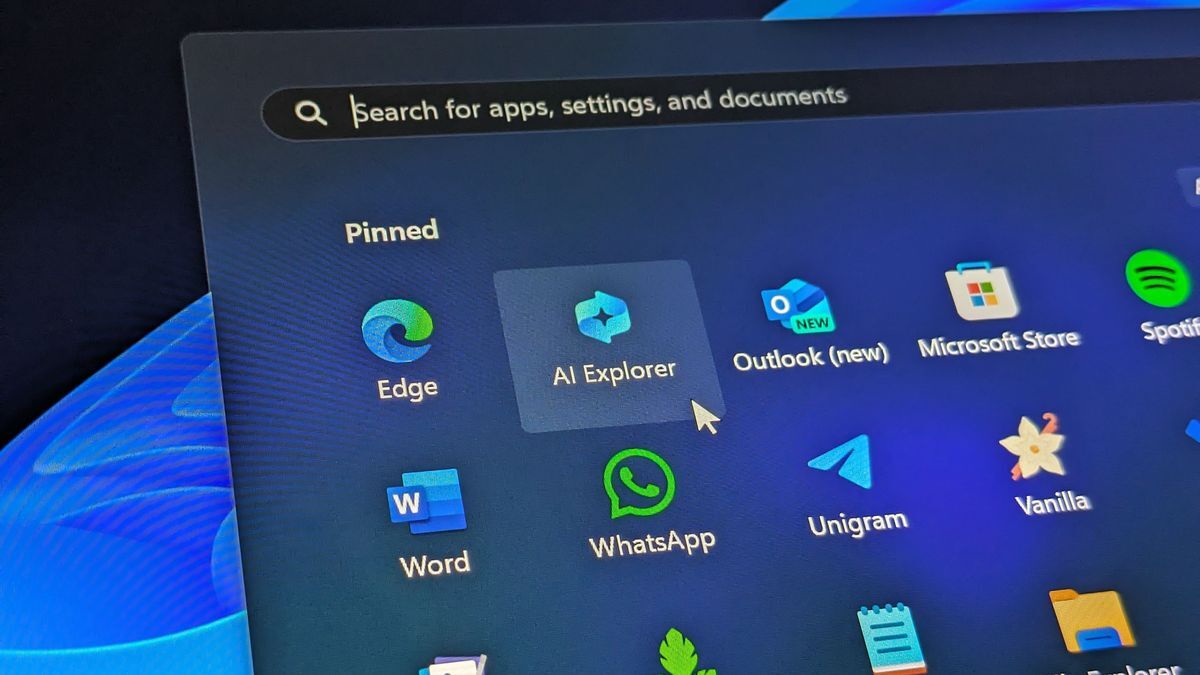
It's an open secret that Microsoft is gearing up to supercharge Windows 11 this summer with next-gen AI capabilities that will enable the OS to be context aware across any apps and interfaces, as well as remember everything you do on your PC to enhance user productivity and search.
These new capabilities are set to ship as part of a new app internally called "AI Explorer," which I'm told will be unveiled during Microsoft's special Windows event on May 20.
The feature is also said to be exclusive to devices powered by Qualcomm's upcoming Snapdragon X series chips, at least at first, as Intel and AMD play catchup in the NPU race.
AI Explorer is able to do more than just remember the things you do on your computer, it's also able to analyze what's currently on-screen and provide contextual suggestions and tasks based on what it can see.
This capability is called Screen Understanding, and I'm told one of the big selling points of AI Explorer is that it's supposed to work across any app, with no developer input required.
The existence of Rewind.ai proves that this is a concept that can be done, and Microsoft is essentially building its own version into Windows 11 that offloads the resources required for such a feature onto NPUs to keep the load away from the CPU.
The original article contains 1,076 words, the summary contains 225 words. Saved 79%. I'm a bot and I'm open source!
All the Windows fanbois must be kicking themselves as of late with Microsoft doing all these Ls, making those switching to MacOS/Linux for a better experience.
Is there such a thing? I’m nearly certain that everyone is using windows as a result of compatibility issues and/or indifference. It’s an oxymoron, like “vanilla enthusiast.”
I've seen not so much fanboys but more like enraged children who were unable to make Linux work with their hardware. Just hanging out wanting to start arguments in the comments sections of linuxmemes. They don't seem to enjoy Windows, they just want to play games on Nvidia cards.
Correct me if I'm wrong, because I'd like to read if Windows has anything comparable to people nerding out about their Linux selfhosted stuff.
I'm gonna be honest with you, Linux is so much more simple than people make it out to be. If it's your first time dipping into that world, you can grab Ubuntu, KDE neon, or Linux Mint, all of which are very stable and beginner friendly. Ubuntu has a more unique look to it, and neon/mint looks more like windows. You can run and manage both without ever having to open a terminal or dive into any code, just use it like a normal computer and you'll be fine. I've been using Linux since about '08, I'm not a sysadmin or coder or anything like that. I play most of my games in Linux with no problem
that's a fair point. I just think the Linux community does itself a disservice by making things seem way more complicated and techy when it's really not that crazy at all. It can be, sure, but that's entirely up to the user
Probably stupid question that I can look up, but I think Linux expounding isn't a problem here:
I have an Intel/Nvidia laptop as my only machine right now. I've read the jokes about how hard it is to get working peripherals and the jokes about the brains of those who can't get them to work.
I'm an amateur web dev (looking to un-amateur) so while a command line isn't super scary, it sure would feel like work or daunting at least for a bit. I also gotta share the machine.
So I guess the question is: how true are those peripheral driver issue things for say random stuff like using a Dual Sense controller with (I think this is the right name) Proton for the gaming nights, and am I right in assuming any distro (except those mutable or atomic distributions that seem to be divisive) that is "beginner friendly" with a GUI for the family is still going to enable me to poke into further learning with the CLI, i.e. you don't sacrifice full featured command line for GUI?
Silly ahead of myself concern, but if I can avoid needing to learn more PowerShell junk and just focus on learning Bash, that's actually a bonus I hadn't thought of.
Those are great questions! Dualsense is supported through drivers provided by PlayStation and to my best recollection, most features work out of the box. Last I recall, the adaptive triggers weren't functional outside of normal trigger activity and the audio jack doesn't audio. Proton is a tool that Steam/Valve made to make most windows games work within Linux without needing a lot of tinkering. I've had mostly success with it, however some games still won't work, usually due to anti cheat software. There's a website called protondb.com that can be used to check the compatibility of most games and it usually offers tips for getting the best performance depending on the game.
As for the GUI vs CLI question, you'll still have full access to the terminal or command line through the terminal emulator. Think of it like the cmd prompt in Windows. You sacrifice nothing by using a graphical interface and can still do all your terminal work without a GUI if you'd prefer, that's entirely up to your preference. For example, with Ubuntu, you have your software center, which is essentially an app store that you can use to download different programs and/or utilities. You can use that, or you can open a terminal emulator and type in something like "sudo apt install Firefox" and it will do the same thing.
Linux can be as complicated or simple as you want to make it, as the owner of the computer, everything is entirely up to you. You can rely entirely on GUI based applications and never run into a problem. I do a little of both, but I've also got several years of experience tinkering around with things.
I don't know what your current level of proficiency is outside of webdev, but if you're familiar with virtual machines, like VMware, you can spin up a virtual environment and test drive Linux without having to modify your existing computer at all. With this being a shared computer, you could always dualboot it. That's when you have two different operating systems installed at the same time. When you power on your PC, you'll get a menu to pick windows or Linux and can switch by restarting your PC to get back to that menu. Windows files will be accessible in Linux, however Linux files are usually not accessible in Windows.
Drivers are pretty easy, most are already built into the Linux kernel. For Nvidia drivers, you have open source drivers, or proprietary drivers. The open source ones are readily available in almost every distro, and the propriety (better performing) drivers are a few clicks away. Most times, you'll be asked if you want the proprietary drivers during your installation and won't have to mess with them ever again.
I know I hit you with a full essay and a half, and it may seem like a lot, but I promise you it's really not as complicated as people like to make it seem. My elderly mother ran Linux on a laptop I gave her years ago without even noticing for years. If you have questions, there's a million and a half different places to ask, including my DMs. Feel free to shoot me a question, and I'll do a little digging to see what I can teach you.
This was amazing. Thank you so much for taking the time to write it all out! I really do have no reason to not dual boot. I only have one site community to manage, and I had help with the original configuration so my exposure to Linux has mostly been the occasional CentOS foray to update the stack throughout the years and start a few experiments that fizzled (but not that backup script! Woo!). I guess seeing it all in one place is just what I needed; there's no reason to give it a VM a try. I already got WSL installed to "try Ubuntu" I told myself, but well, didn't have much of a project to try. Your "essay" was the information I needed to get me to just give dual booting a try, work on daily driving it (I write as a hobby, and I heard there's a trillion of good open source note apps out there, so there's mini-project one, get a dual boot and a basic "Music,coffee,notes,wordprocessor" no-frills inst--Oh, I see how it starts with y'all. Thanks for your time, truly!
Lol anytime my dude! There's plenty of options out there for you. I personally use vim for journalling and some other light text stuff, but that's a fairly minimal terminal tool. You can go that route, or you can grab Libre Office (Microsoft office alternative), or whatever else best fits your wants and needs. Like I said, my DMs are open if you have questions, but I do want to reiterate that I am not a professional, I'm just some dude who learned about this junk in highschool and has been using it as your average everyday computer nerd. I hope you not only learn a few things, but I hope you have fun exploring. If it doesn't work out, oh well, nuke it and go back to what works best for you. It's your computer, use it how you want to, don't let anyone else tell you otherwise.
One last recommendation before I hop off my soapbox, assuming you give Ubuntu a shot, I'd recommend checking out some of their different "flavors". They all work the same under the hood, but give you a different UI to work within. You can swap whenever, or run all of them, it's your call. I prefer Gnome (the G is not silent), it's Ubuntu's default, but there's Mate (pronounced like the tea, mah-tay), Kde (short for Kool desktop environment, no I'm not joking), xfce, unity, and more. Other than that, have fun!
Install Ventoy onto a USB, copy over a few distro images onto it, and now you can boot up and try a few.
If you know anyone running Linux just run the same distro as them unless it's one of the intimidating ones: easiest way to beat the learning curve is to work with someone else. Otherwise grab a beginner-friendly distro. I once started with Ubuntu but today I'd probably start with PopOS
Yet again it's a feature that can be disabled, not to mention your hardware probably will not even support it. Obviously something like AI assistant will monitor everything you do same as voice assistants like Google and Alexa monitors audio 24/7 if you want to wake it up with voice commands. Article mentions a macOS software doing exact same thing called Rewind.
Unless all of important recorded data will not be saved locally, this is yet another nothingburger instead of ″Look at Microsoft killing itself, everyone will move to Linux next year″ nonesense.
Would I personally use this feature? Probably not, I would disable it and move on mainly because I have no need for this. Will there be people who will use this? Absolutely.
When you HAVE to use it at work and you have NO choice in the matter it's really irritating seeing all these posts berating you instead of the company itself.
Additionally most of the time most of these features come automatically disabled if you leave in the EU like me, cause of, you know, GDPR.
So yes, they need to make it an optional feature because fines based on revenue are no joke. That said you are not gonna convince people by berating them with clown emojis, you'll only prove that whatever you are advocating for is supported by a toxic community.
But you do you...
Bootlicker making excuses for predatory corporate practices will not be convinced. Merely identifying this comment as work of a bad faith actor for purposes of the discussion.
He is entitled to his opinion and I can challenge it as I see the most effective. That's how the internet works...
Nobody said you can't, just know that whatever you write in a public space will be read by everyone.
Being aggressive by namecalling and taunting will make you look bad and whatever you preach will look bad to everyone.
Sorry for being so annoying about it, just wanted to share this thought with you.
You always could have disabled Cortana (no longer a thing btw) and you can disable Copilot if that's what you thought about. Edge is another story, it does provide other functionality (WebView2) and is not just a Web browser so there is no official way to disable it. There will be something close to disabling it, but I doubt it will be truly removed from OS, just hidden from sight. Use another browser and forget it is there, I see it only if I explicitly search for it.
If you want to truly make your OS yours and fully remove most of the stuff you do not want, Windows is not and never will be for that, ″King of customization″ title belongs to Linux.
All we have here is people losing their minds over a new feature that can be disabled.

124 replies
They really want me to shift my gaming PC to Linux. Gaming is the only reason it's still in windows 10.
But now? Ads? Full time spying? And they choose to do all this at a time when proton is making gaming on Linux easier than ever?
Okay then. Heck. I'll gladly help my friends install Linux in their main device.
Hey government. This includes all your devices too. I'm sure you'll be able to turn it off, and by some bug oversight it just hides everything but not actually turn it off.
Do something about it. Stop blindly trusting bigcorp to do the right thing. They've proven time and time again they WILL NOT.
My work computer upgraded to 11 last week and I'm sure I'm giving away people's personal info via the OS
My work is also rolling out the Win11 updates, and I am wondering if they knew about this. There are many things that require secret/TS clearance via temp badge and pass on certain project as well as low level sensitive documents.
If Win11 is recording all of this, they have committed about 100,000 felonies by illegally recording these documents from not just us but all the government contractors.
I switched over a year ago. Love it.
I can't make my mind up over a distro tbh.
I've used Ubuntu for a long time, but I absolutely hate snap packages.
Doubting between endeavoros, garuda and popos. Imnsure they're all viable, though my main experience has been with apt and Debian based distros
Linux Mint Debian Edition
How does the Debian edition differ from normal mint?
It's Debian instead of normal mint.
...but seriously, it uses Debian as a base for its upstream packages instead of Ubuntu. They're very similar and you won't notice a difference.
I'll disagree and suggest to go with the latest release of the normal (Ubuntu-based) Mint instead. I prefer Debian over Ubuntu, but there's realistically little difference. And if you're just getting into the Linux world, you'll want to be using what's used by most people in case you run into problems and want to follow written instructions or ask for support.
I agree, I don't suggest newbies run less popular distros. Overcoming the learning curve is easier when you have lots of documentation and support.
It doesn't matter, they all install the same thing. Just pick whatever your friendly neighbour uses.
I mean kinda, but there are still some software and version differences that can make some stuff behave differently. my brother has been tinkering with chromebook with touch screen. and he hasn't found a distro yet where everything works. in some distros sound doesn't work, in some touchscreen doesn't work, in some keyboard doesn't work etc.
so while the experience is mostly same there are still some differences, they do show up easier with odd hardware though
Mint & popOS are both Debian tree distros and Ubuntu derivatives without the snap cruft.
They work fine for gaming in my experience as any linux native game is always tested against ubuntu and I've had no issues with Steam/proton for windows games.
No EAC anti cheat compatability for Linux of any flavour of course.
Why not good old Mint?
I've been considering putting Mint on my system, then adding the new version of Unity that Canonical doesn't contribute to. Last time I used Linux was when Ubuntu finally had Unity working well and I really miss the HUD thing. Tapping alt to search the menus for the tool I wanted in Gimp was very nice.
Dont you have to reinstall mint if you want to install os updates?
No. Both day to day patches and major upgrades are done through the update manager app
I think they have an automated script that does it now?
GUI is primary, a few clicks in the same app that you do your normal day to day updates in when a major release comes out.
There is a command line version but the gui is a doddle, and there's no driving reason to use the CLI - it's a distro aimed at beginners
I have no idea. I wound up removing Linux from my system years ago due to Pulse/ALSA problems and going back to Windows. Not willing to pay a subscription for extended Win10 support, and I won't touch 11, so I'm looking at moving back to Linux. Especially since audio is supposed to be better now.
If it's mostly for gaming you should che k out BazziteOS
With 24 It let's me choose Debian instead of snap for some apps at least.
I'm currently using Endeavouros (btw) but Fedora is a solid distro as well.
Used it for years until just recently when I got a new laptop and decided to give managed Arch a go
I've had great experiences with garuda. Heavily underrated distro.
It’s not that hard to disable snap.
It isn't. But they are pushing it more aggressively. The latest release will tell you it can't even open .deb files anymore. The Ubuntu store will load indefinitely and not be able to install it. ( read it in a blog post ). And it's opening deb files in archive manager by default rather than the software centre.
Even if it is just a bug. It is one they are refusing to fix ( and one that I can't imagine being difficult to solve ).
It still works over CLI for now, which is how I usually install deb's. But if I have to go online to download all kinds of debs it feels like I'm back in the 90s windows downloading a bunch of exe's I no have to manage myself.
It's more of a statement against Ubuntu and how canonical is handling the snap packages. Maybe it won't be so easy to disable it in the future. Or maybe apt will barely be able to install anything anymore if you disable snap since that seems to be all they went you to run.
In any case. I don't really like the direction they're headed, and I'd rather not have to distro hop in two years because canonical decide to make snap mandatory.
Snap has not worked out well for me in the past :(.
I use Kubuntu, and it never pushed snaps to me, and disabling them took 5 mins.
We're in a thread about Windows malfeasance and that's what the Windows users say about their ad-ridden trash heap of an OS. Why would we tolerate the same behavior just because it is on top of a Linux kernel?
if you want easy gaming with fast set up try nobara. it's fedora based I really like it
I'm used to gnome, and I currently tried out garuda. It's a tad weird as there's no app bar anywhere with "running apps". If I execute it again it just starts a new one. Which is strange behaviour.
It works quite well for what it should do, but I'm feeling a bit lost in it. It also feels if I'd want to do something else ( like coding ) that it wouldn't be very intuitive.
The nobara gnome screenshot looks similar ( no app drawer ). Are you running it in gnome or kde/official?
you can change that from gnome tweaks I believe. and I have gnome underneath but I use i3. i used to have just fedora with just the i3 using fedora installer but it got a bug of some kind that I just didn't get the propiertary nvidia drivers to work no matter what I did
Microsoft sure is putting a lot of effort into improving Linux lately
switching a while back was best decision ever esp since Windows situation has been rapidly deteriorating. Yes to get most of linux there is a learning curve but once that is down, it is a superior experience most of the time. Privacy and Security is the cherry tho.
What did ya swap too? I can’t seem to find a distro that discord works flawlessly on 🤔
Tried mint but ended up with popos.
Don't use discrod so can't comment if it works otherwise satisfied
What's your discord issue ? It's been working fine for me for years
Screen sharing not passing audio.
Use vesktop instead. (it's in flatpak for example)
Discord snap on ubuntu has been working fine for me
Ohhh. Interesting. Afaik it doesn’t work natively. avoiding Ubuntu for now. Testing Garuda and a few others this week.
Windows 11 is really shooting itself in the foot. Not just the privacy implications of this, but also the CPU and memory usage will surge once again. Why is this important?
I went to an electronics store recently to see the state of brand new laptop performance in 2024. Here's what I found:
Laptops with 16GB RAM, an SSD, and a good CPU (3K/13K single/multi thread on Passmark) will run Windows 11 smoothly. File manager, task manager takes about a second to open, while the start menu takes around 400ms. It feels like a truck with 350hp.
Laptops with 8GB RAM, an SSD, and a mediocre CPU (2.5K/9K Passmark) will noticably struggle with Windows 11. The file manager takes 3 seconds to open and the start menu takes 1 second, with stutters and hiccups using it. It'll be usable, but quite slow. It feels like a truck with 100hp.
Laptops with 4GB RAM, eMMC, and a bad CPU (1.5K/4K Passmark) will be brought to its knees by Windows 11. Task manager takes 27 seconds to open! A web browser takes even longer, and loading my light game somehow took 7 seconds (this game loaded in under a second on the better computers) to open. The CPU, RAM, and storage were pinned to 100% most of the time. Completely unacceptable performance, it's like a truck with 10hp.
And a laptop with the above but with a CPU with a Passmark score of 1K/2.5K was so bad that it couldn't open literally anything in Windows 11. It's literally a brick. I cannot believe the store (a giant multinational company) is selling this laptop. It's like a truck with 5hp that cannot go up a moderate hill.
But now, the store also sold ChromeOS laptops. As much as I hate how locked down ChromeOS was, I was delighted by the performance of it. The worst laptop specs I mentioned (4GB RAM, 64GB eMMC, CPU with 1K/2.5K Passmark score) ran actually quite reasonably on ChromeOS. It opens Chrome in about 3 seconds, and my game in 1 second, with some stutters but no freezes. It struggled with YouTube, but this is due to YouTube's own bloat, which is like a 1000lb trailer to a bike with 5hp.
In conclusion, Windows is losing due to its incredible bloat. It'll make every computer--including my friend's 7900X, 4070, 1TB SSD, 64GB RAM, water-cooled beast--sweat, and will make low-end computers unusable. The super locked down ChromeOS is literally more desirable to me on laptops under $400. Yet Microsoft is still deciding to add even more bloat! No wonder why Linux market share is skyrocketing, because Windows can barely run on their computers!
I know you can disable this, but most non-techy people won't even know this exists and won't do anything to disable it, because they just want to browse the web and read emails. But the added bloat by this "feature" will cause them to notice their computers are even slower, and switch away from Windows when they realize they need a $800 Windows laptop to have a smooth OS experience, when they can buy a $250 Chromebook or $1000 Mac with a smooth OS experience.
TL;DR: Microsoft is shooting itself in the foot by adding more bloat to an obese OS, and Windows's bloat is its biggest liability.
I disagree with Windows shooting itself in the foot
People will just buy better computers and throw out the ones that “don’t work”
We are about to get a lot of very usable hardware at second-hand prices.
They will buy better computers. Will it run Windows?
I really want this to become the new "Can it run Crysis".
Windows 11 is probably heavier than the original Crysis in all metrics, and more than its sequels in certain metrics.
Even if you can, the ones that do that get annoyed once again, as it will likely in windows tradition be randomly reset after an update: "oops, we reframed this feature you previously consciously turned off and thought we'ld give it a spin for you"
"AI Explorer will utilize next-gen neural processing unit (NPU) hardware to process these machine learning and generative AI experiences locally on the device with low latency."
"The feature is also said to be exclusive to devices powered by Qualcomm's upcoming Snapdragon X series chips,"
Tl;dr: you should read the article first
If you actually read Qualcomm's white paper for their NPU you'd know OPs concerns about windows resource bloat is still a reasonable concern to have at least on the memory side of things.
The memory on their SoC is shared between the CPU, GPU, and critically the NPU. This is so they can save on memory bandwidth since they won't have to copy the same data potentially three times over. However this also means by adding more AI bloat into windows will also clog up precise memory that could be used elsewhere.
That SoC, the snapdragon elite x supports eight channels of LPDDR5x which means the lowest amount of memory we could see is 16Gb assuming all eight channels used with 2Gb memory packages (which is the smallest size JEDEC allows LPDDR5x).
Is that really going to be enough for everything? In my opinion no because the the GPU will take a chunk, windows will take a chunk, the NPU will take a chunk, and the storage will try to take a chunk for caching if there's anything left.
TL;DR: You should read the white papers instead of the marketing fluff articles.
While that is compelling evidence, I offer a counterpoint:
He owns an airfryer.
The article said "The feature is also said to be exclusive to devices powered by Qualcomm's upcoming Snapdragon X series chips, at least at first.
And even if it requires a PC with at least 16GB RAM, then those computers will feel slower than they should be.
So far. Gotta boil the frog slowly.
Much of is = Some of isn't
The heats already turned up and they're about to put the lid on
Yeah, right.
If they're already saying "much" to hedge that, I give until the end of the year before it is literally all of the information going to their servers.
they'll probably do a lot of computation ally expensive preprocessing / analysis of your behavior on-device to save costs. They'll only send home the relevant results of the analysis. So it's "only very little of the data" - like the important part :-)
I try to swear only when I mean it, and fuck off Microsoft. I'd rather take the few seconds or even couple minutes it takes to type out the beginning of an e-mail or set up a new app than have something recording my every move.
The development will be something like: in 2025 it will be offline, optional, and meant to optimize efficiency. In 2026 it will be online, mandatory for updates, and also used to optimize advertising. Finally in 2027 it will be fully integrated and aimed at sales of extensive data to companies who desire to know what habits users exhibit and so on. I have no faith whatsoever that my interests will outweigh the potential profits of knowing what every PC user is doing all the time.
In 2025 „much“ of it is „rendered on device“. Meaning that a part of it is not. It also leaves open what is uploaded to Microsoft.
Wtf
Products you pay for should not have the ability to exploit you.
If micro$oft wants to provide free computer software to all it's exploited users, that's a different conversation.
Until then you have better options available.
how much did your windows 11 upgrade cost?
They might be referring to the hardware, or the Windows 10 license sold alongside that.
Why was the upgrade free?
$0.00 because I have been using Kubuntu for 14 years.
Wasn't it already like that on Windows 10 ?
Yes. That's why I use Win7 for legacy stuff and Linux for everything else. On Win7 it was still easy to deactivate (disable a few Tasks and a few checkboxes). Since the updates stopped that PC is super stable too.
noneedtolecturemeaboutmuhsEcuRitYuPdAtEs.Iknow.AsifanyMicrosoftSoftwarewaseversecure.Microsoft software software isn't really insecure.
Thanks. That was a good one. Maybe compared to what Cisco does they are passable.
Lemmy really is just an anti Windows circlejerk that ignores all facts.
What facts? Genuinely curious. Microsoft Software in general is pretty bad when it comes to found and or exploited security problems.
I admit with all the legacy compatibility it must be hard to maintain Windows, but other projects manage that better.
This is no proof, but a data point: https://www.cvedetails.com/top-50-vendors.php
theyre finally admitting to doing it (they have been doing it for about a decade now)
It’s probably their shock and awe strategy. They are pushing this anti privacy shit hard and then pull back on it on the next release. But in reality they leave a lot of that shit in. Like how Windows 10 is worse than windows 7, but it’s better than 8 so 10 feels like an improvement for people.
SteamOS can't become a better alternative any sooner.
Actually real, I'm genuinely planning to flash steamOS os my school laptop, sincr I have no need for adobe apps, I usually use web based stuff and the apps I do want are just games id likely be able to run through proton.
I don't know what you do or do not know about Linux, but I'd highly recommend using a desktop Linux distribution instead, like Fedora, OpenSUSE, Debian, or Arch. Something with quick releases so you get new performance improvements and bugfixes quickly.
SteamOS in particular is really cool on a handheld, but would be kind of irritating to use on a regular laptop. It's also immutable, which protects you from fucking up too bad, but also makes certain types to configuration way harder.
I love Arch, but don't install it unless you want to learn how it works. Archinstall is quick and easy if you aren't scared of the terminal, but it doesn't hold your hand at all and you will break something if you don't read the news or fuck about without knowing what you're doing.
I got rid of my Surface, bought a FrameWork, and installed PopOS on it. Can't say I'm any kind of a PC guru, certainly not a Linux expert, but it works awesome. I have zero complaints or regrets.
And I'm learneding.
I've been using Linux since 4 years ago, I've distro hopped between Ubuntu, OpenSuse, Fedora and others, I'm currently on Fedora and its working well. I'm not too sure how to manually integrate windows apps into the mix, but it sounds it would take time I don't really have.
ive known of the pitfalls of SteamOS, i fully agree with you on that and i was considering using it as a 2nd or 3rd option. someone actually mentioned me to use Bazzite, basically fedora based steamOS with either KDE or GNOME, and Android apps through Waydroid.
trying to get windows apps working for me at least was quite difficult last year, ill try it out this time and see if its easier, but if its not i may just switch to bazzite or other steamOS like distros.
Thanks man, I was actually trying tomake a similar implementation on another machine to test out, since I use fedora, but I never knew I could get it out of the box. I'll try this out on one of my mains since I distro hop occasionally on there to test stuff.
bro is NOT using steamos on their laptop 😭
Looks like Ubuntu is going to be back on the menu.
Try Mint or popOS. Ubuntu is getting very microsofty themselves
This is the best summary I could come up with:
It's an open secret that Microsoft is gearing up to supercharge Windows 11 this summer with next-gen AI capabilities that will enable the OS to be context aware across any apps and interfaces, as well as remember everything you do on your PC to enhance user productivity and search.
These new capabilities are set to ship as part of a new app internally called "AI Explorer," which I'm told will be unveiled during Microsoft's special Windows event on May 20.
The feature is also said to be exclusive to devices powered by Qualcomm's upcoming Snapdragon X series chips, at least at first, as Intel and AMD play catchup in the NPU race.
AI Explorer is able to do more than just remember the things you do on your computer, it's also able to analyze what's currently on-screen and provide contextual suggestions and tasks based on what it can see.
This capability is called Screen Understanding, and I'm told one of the big selling points of AI Explorer is that it's supposed to work across any app, with no developer input required.
The existence of Rewind.ai proves that this is a concept that can be done, and Microsoft is essentially building its own version into Windows 11 that offloads the resources required for such a feature onto NPUs to keep the load away from the CPU.
The original article contains 1,076 words, the summary contains 225 words. Saved 79%. I'm a bot and I'm open source!
Good. Let the enshittification flow through you!
All the Windows fanbois must be kicking themselves as of late with Microsoft doing all these Ls, making those switching to MacOS/Linux for a better experience.
Is there such a thing? I’m nearly certain that everyone is using windows as a result of compatibility issues and/or indifference. It’s an oxymoron, like “vanilla enthusiast.”
I've seen a fair few. Depending on where you're talking you're liable to get called poor for suggesting the switch to Linux.
LOL. I spent money to get good hardware, why would I then choose the worst-performing ad-ridden bloatware?
But MS provides windows for free. It just has an ugly "activate windows" watermark.
I've seen not so much fanboys but more like enraged children who were unable to make Linux work with their hardware. Just hanging out wanting to start arguments in the comments sections of linuxmemes. They don't seem to enjoy Windows, they just want to play games on Nvidia cards.
Correct me if I'm wrong, because I'd like to read if Windows has anything comparable to people nerding out about their Linux selfhosted stuff.
Yeah where I’m from esp, mostly within the gaming/tech community tbh. Not so much general population.
I can read, count, and combine them into steps followed in a sequential order. Can I Linux? I think I can Linux. These fucks are taking the piss.
I'm gonna be honest with you, Linux is so much more simple than people make it out to be. If it's your first time dipping into that world, you can grab Ubuntu, KDE neon, or Linux Mint, all of which are very stable and beginner friendly. Ubuntu has a more unique look to it, and neon/mint looks more like windows. You can run and manage both without ever having to open a terminal or dive into any code, just use it like a normal computer and you'll be fine. I've been using Linux since about '08, I'm not a sysadmin or coder or anything like that. I play most of my games in Linux with no problem
In many ways it’s easier to use than Windows, as long as there aren’t expectations that it works like Windows.
that's a fair point. I just think the Linux community does itself a disservice by making things seem way more complicated and techy when it's really not that crazy at all. It can be, sure, but that's entirely up to the user
Probably stupid question that I can look up, but I think Linux expounding isn't a problem here:
I have an Intel/Nvidia laptop as my only machine right now. I've read the jokes about how hard it is to get working peripherals and the jokes about the brains of those who can't get them to work.
I'm an amateur web dev (looking to un-amateur) so while a command line isn't super scary, it sure would feel like work or daunting at least for a bit. I also gotta share the machine.
So I guess the question is: how true are those peripheral driver issue things for say random stuff like using a Dual Sense controller with (I think this is the right name) Proton for the gaming nights, and am I right in assuming any distro (except those mutable or atomic distributions that seem to be divisive) that is "beginner friendly" with a GUI for the family is still going to enable me to poke into further learning with the CLI, i.e. you don't sacrifice full featured command line for GUI?
Silly ahead of myself concern, but if I can avoid needing to learn more PowerShell junk and just focus on learning Bash, that's actually a bonus I hadn't thought of.
Those are great questions! Dualsense is supported through drivers provided by PlayStation and to my best recollection, most features work out of the box. Last I recall, the adaptive triggers weren't functional outside of normal trigger activity and the audio jack doesn't audio. Proton is a tool that Steam/Valve made to make most windows games work within Linux without needing a lot of tinkering. I've had mostly success with it, however some games still won't work, usually due to anti cheat software. There's a website called protondb.com that can be used to check the compatibility of most games and it usually offers tips for getting the best performance depending on the game.
As for the GUI vs CLI question, you'll still have full access to the terminal or command line through the terminal emulator. Think of it like the cmd prompt in Windows. You sacrifice nothing by using a graphical interface and can still do all your terminal work without a GUI if you'd prefer, that's entirely up to your preference. For example, with Ubuntu, you have your software center, which is essentially an app store that you can use to download different programs and/or utilities. You can use that, or you can open a terminal emulator and type in something like "sudo apt install Firefox" and it will do the same thing.
Linux can be as complicated or simple as you want to make it, as the owner of the computer, everything is entirely up to you. You can rely entirely on GUI based applications and never run into a problem. I do a little of both, but I've also got several years of experience tinkering around with things.
I don't know what your current level of proficiency is outside of webdev, but if you're familiar with virtual machines, like VMware, you can spin up a virtual environment and test drive Linux without having to modify your existing computer at all. With this being a shared computer, you could always dualboot it. That's when you have two different operating systems installed at the same time. When you power on your PC, you'll get a menu to pick windows or Linux and can switch by restarting your PC to get back to that menu. Windows files will be accessible in Linux, however Linux files are usually not accessible in Windows.
Drivers are pretty easy, most are already built into the Linux kernel. For Nvidia drivers, you have open source drivers, or proprietary drivers. The open source ones are readily available in almost every distro, and the propriety (better performing) drivers are a few clicks away. Most times, you'll be asked if you want the proprietary drivers during your installation and won't have to mess with them ever again.
I know I hit you with a full essay and a half, and it may seem like a lot, but I promise you it's really not as complicated as people like to make it seem. My elderly mother ran Linux on a laptop I gave her years ago without even noticing for years. If you have questions, there's a million and a half different places to ask, including my DMs. Feel free to shoot me a question, and I'll do a little digging to see what I can teach you.
This was amazing. Thank you so much for taking the time to write it all out! I really do have no reason to not dual boot. I only have one site community to manage, and I had help with the original configuration so my exposure to Linux has mostly been the occasional CentOS foray to update the stack throughout the years and start a few experiments that fizzled (but not that backup script! Woo!). I guess seeing it all in one place is just what I needed; there's no reason to give it a VM a try. I already got WSL installed to "try Ubuntu" I told myself, but well, didn't have much of a project to try. Your "essay" was the information I needed to get me to just give dual booting a try, work on daily driving it (I write as a hobby, and I heard there's a trillion of good open source note apps out there, so there's mini-project one, get a dual boot and a basic "Music,coffee,notes,wordprocessor" no-frills inst--Oh, I see how it starts with y'all. Thanks for your time, truly!
Edit: Missed important word.
Lol anytime my dude! There's plenty of options out there for you. I personally use vim for journalling and some other light text stuff, but that's a fairly minimal terminal tool. You can go that route, or you can grab Libre Office (Microsoft office alternative), or whatever else best fits your wants and needs. Like I said, my DMs are open if you have questions, but I do want to reiterate that I am not a professional, I'm just some dude who learned about this junk in highschool and has been using it as your average everyday computer nerd. I hope you not only learn a few things, but I hope you have fun exploring. If it doesn't work out, oh well, nuke it and go back to what works best for you. It's your computer, use it how you want to, don't let anyone else tell you otherwise.
One last recommendation before I hop off my soapbox, assuming you give Ubuntu a shot, I'd recommend checking out some of their different "flavors". They all work the same under the hood, but give you a different UI to work within. You can swap whenever, or run all of them, it's your call. I prefer Gnome (the G is not silent), it's Ubuntu's default, but there's Mate (pronounced like the tea, mah-tay), Kde (short for Kool desktop environment, no I'm not joking), xfce, unity, and more. Other than that, have fun!
Install Ventoy onto a USB, copy over a few distro images onto it, and now you can boot up and try a few.
If you know anyone running Linux just run the same distro as them unless it's one of the intimidating ones: easiest way to beat the learning curve is to work with someone else. Otherwise grab a beginner-friendly distro. I once started with Ubuntu but today I'd probably start with PopOS
It won't record mine. 🍥🐧😁
Time to get acquainted with Tux
What's Tux?
Name of the linux mascot, its the penguin you usually see associated with linux
Thanks
So if finally is time to boot Linux on my surface book
Same...uh, recommendations?
There is a git with all surfaces lined up. Linux on surface or something. Great place to start, but beware that a lot of functions might not work
If you see Kay, tell her no
Pi.hole baby.
Do you block outgoing?
This really sounds like a security nightmare in the waiting
"Cortana, take care of this captcha for me."
as if windows wasn't already bloated and slow as hell, now your CPU is running a real time audit! Now that's Quality Service with a capital kewoo
Kodachi on my main machine sounds like a good idea now.
Man its going to ask me to stop watching porn.
Yet again it's a feature that can be disabled, not to mention your hardware probably will not even support it. Obviously something like AI assistant will monitor everything you do same as voice assistants like Google and Alexa monitors audio 24/7 if you want to wake it up with voice commands. Article mentions a macOS software doing exact same thing called Rewind.
Unless all of important recorded data will not be saved locally, this is yet another nothingburger instead of ″Look at Microsoft killing itself, everyone will move to Linux next year″ nonesense.
Would I personally use this feature? Probably not, I would disable it and move on mainly because I have no need for this. Will there be people who will use this? Absolutely.
until it cant.
microsoft is a convicted abusive mega-corp; we know how this ends.
I am personally thankful I and my circle have at least a partial out of this bullshit.
stop excusing and enabling the panopticon.
disable it like cortana and edge?
i really don't get this angle though... bad corporate behvaior and this guy is trying to explain that it is not big deal haha
🤡🤡🤡
When you HAVE to use it at work and you have NO choice in the matter it's really irritating seeing all these posts berating you instead of the company itself. Additionally most of the time most of these features come automatically disabled if you leave in the EU like me, cause of, you know, GDPR. So yes, they need to make it an optional feature because fines based on revenue are no joke. That said you are not gonna convince people by berating them with clown emojis, you'll only prove that whatever you are advocating for is supported by a toxic community. But you do you...
Bootlicker making excuses for predatory corporate practices will not be convinced. Merely identifying this comment as work of a bad faith actor for purposes of the discussion.
He is entitled to his opinion and I can challenge it as I see the most effective. That's how the internet works...
Nobody said you can't, just know that whatever you write in a public space will be read by everyone. Being aggressive by namecalling and taunting will make you look bad and whatever you preach will look bad to everyone. Sorry for being so annoying about it, just wanted to share this thought with you.
People can't read between the lines anymore?
I am not saying you are wrong per se but here their position had no weight..
Also, there is a thing called artistic flair.
You always could have disabled Cortana (no longer a thing btw) and you can disable Copilot if that's what you thought about. Edge is another story, it does provide other functionality (WebView2) and is not just a Web browser so there is no official way to disable it. There will be something close to disabling it, but I doubt it will be truly removed from OS, just hidden from sight. Use another browser and forget it is there, I see it only if I explicitly search for it.
If you want to truly make your OS yours and fully remove most of the stuff you do not want, Windows is not and never will be for that, ″King of customization″ title belongs to Linux.
All we have here is people losing their minds over a new feature that can be disabled.
Pfft