Spyke

Posts

selfhosted·Selfhostedbyirmadlad

Weather Data: Small Steps - Big Ambitions

Progress Report:

So, building on @captcha_incorrect 's n8n script he graciously offered, and pulling data into Grafana, and learning how to python correctly....it's been a journey. However, I am happy to report that I have some weather data now. It's by no means a finished product but I have made some progress.

::: spoiler spoiler

:::

The extended forecast in the right hand side took me some time to figure out pagination so I could scroll through 5 days in advance. The weather tab at the top left will get a couple more tabs. One for forecast map, if I can figure that out. LOL

View original on lemmy.world
selfhosted·Selfhostedbyirmadlad

How To Parse JSON Data To A Human Readable Format [SOLVED]

So, yes this is selfhosting related. I am working on an n8n flow to pull in weather data so that I can have this data on a dashboard. I can't find any dockerized weather forecasting apps. Most of them connect to a personal weather station, which might be an option in the future. For the time being, this is a little project I'm working on.

Partial JSON snippet:

::: spoiler spoiler

0	
json	
cod	"200"
message	0
cnt	40
list	
0	
dt	1780693200
main	
temp	29.4
feels_like	29.23
temp_min	29.4
temp_max	29.68
pressure	1019
sea_level	1019
grnd_level	984
humidity	42
temp_kf	-0.28
weather	

:::

I would like to display something like this:

::: spoiler spoiler

Current temperature: 23.25 °C
Feels like: 24.09 °C
Low / High: 23.25 °C / 23.60 °C
Humidity: 94%
Atmospheric pressure: 1023 hPa (sea level: 1023 hPa, ground level: 988 hPa)
Temperature correction factor (temp_kf): -0.35

Weather: Light rain
Weather code: 500
Short condition: Rain
Icon: 10d

:::

So, this is for you devs or coders out there. I can produce the JSON data. I'm just not sure how to parse it to something meaningful. I'm sure Python will have to be incorporated, but unsure of how to proceed.

Maybe someone could point me in a direction to tuts, articles, or your own experience. Sorry the JSON data doesn't format correctly. Lemmy formatting doesn't seem to allow that.

ETA: For anyone wandering across this, here is the solution: https://lemmy.world/post/47961985/24201369 thanks to @captcha_incorrect for his generosity and time.

View original on lemmy.world
selfhosted·Selfhostedbyirmadlad

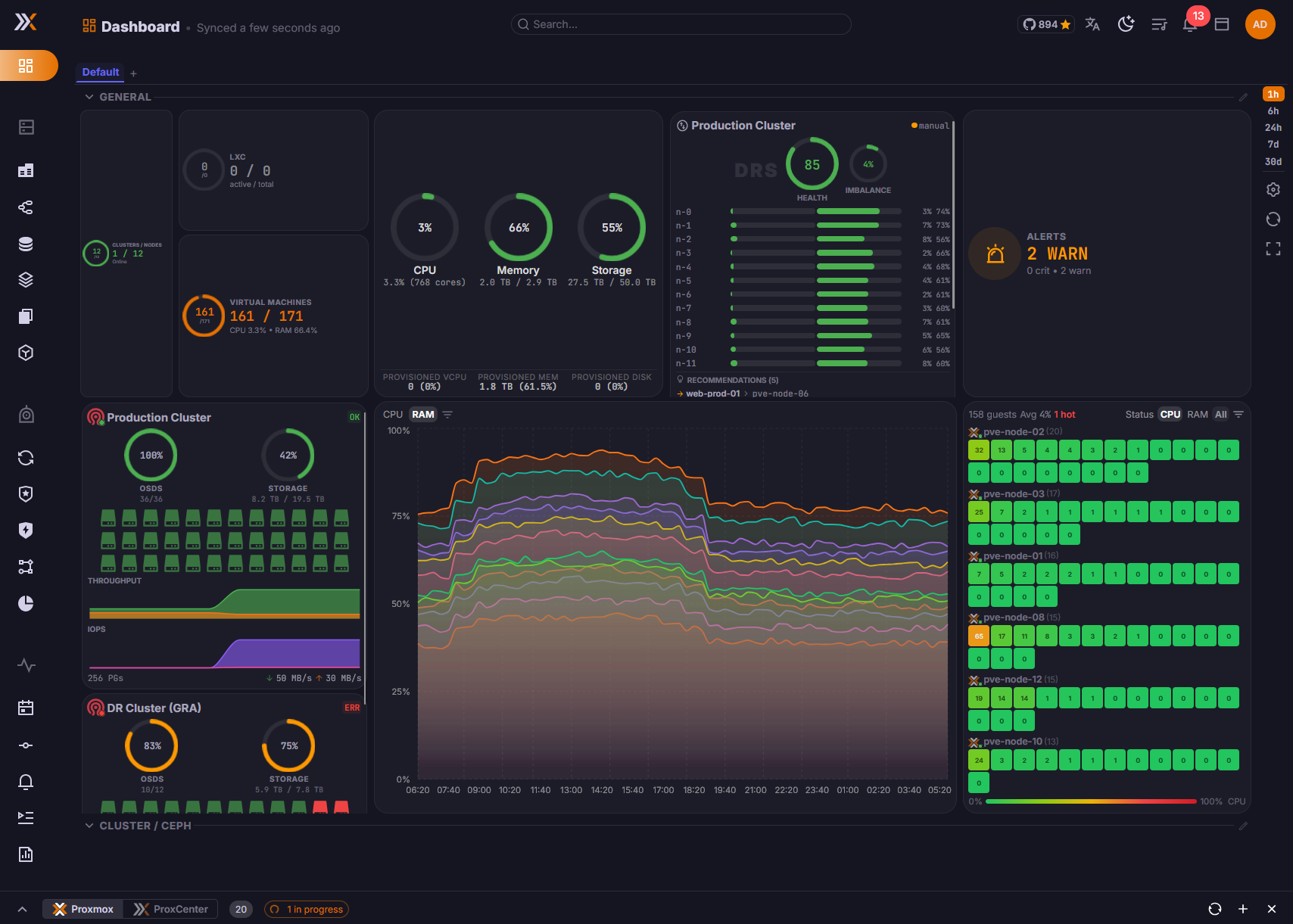
All You Proxmox Users - ProxCenter

I just recently stumbled on this and I've never heard anyone here that uses it. It looks quite interesting. A dash for your Proxmox server.

The live demo looks jammy: https://demo.proxcenter.io/

The docs look quite comprehensive: https://docs.proxcenter.io/

Github: https://github.com/adminsyspro/proxcenter-ui

Runs in a Docker container. There is an community version and an enterprise version. I think I'm going to bump this up the Projects list to the top.

All You Proxmox Users - ProxCenterhttps://www.proxcenter.io/Open linkView original on lemmy.world
selfhosted·Selfhostedbyirmadlad

I've Got 'Night Of The Living Dead' On My Homelab Server

=> There are 90 zombie processes.

On one of my Homelab servers running Ubuntu Jammy, I always seem to get zombie processes. A quick check with ps -eo pid,ppid,stat,cmd | grep -w Z shows them all . It just bugs me. I shut down the server in the most nicest of ways I know how with sudo shutdown -h now but I always get zombie processes shown on start up.

Am I missing something? Do these show up on your servers? How do you deal with them besides just ignoring them if they are ?

View original on lemmy.world
selfhosted·Selfhostedbyirmadlad

Navidrome & demo.navidrome.org [SOLVED]

I posted this over at https://discuss.tchncs.de/c/navidrome, but I thought I'd post it here, maybe someone has had experience with this.

I've been noticing demo.navidrome.org showing up in my firewall:

pFsense:

abuseipdb.com:

As with anything entering or exiting my network, I am cautious and curious why my instance of Navidrome has the need to contact demo.navidrome.org.

I am running Navidrome as a Docker Instance. I have combed my compose file and can find nothing in that itself that would trigger Navidrome to 'call home'.

Is this for stats, or other? As of right now, I have demo.navidrome.org blocked until I've gathered some information.

BTW, sweet piece of opensource software. I tip my hat to the dev team(s).

View original on lemmy.world
selfhosted·Selfhostedbyirmadlad

Network Security Audit

From time to time I like to review my network to see where I can tighten up. Review logs, check out the landscape, and make sure there are no gaps. Today, I have some downtime, so I figured it'd be a good for it. Since I am not a certified IT professional, this is what I have cobbled together reading, and seeing what others have done. I'd like to bounce this off you guys who are more experienced than I and get your impressions. If you have any recommendations, I'm always down to be schooled.

So if you'd like to participate in my audit, I have a home network as follows:

  • Modem receiving IP from ISP. Modem to router. Router to stand alone pfsense firewall. Router has a 54 character complex password for WiFi. There are no guest provisions for WiFi.
  • Pfsense firewall with pfblockerng & suricata running on both lan and wan, both with a full array of rules/feeds updated daily. pfsense has tailscale as an overlay vpn. Server traffic and PC traffic have their own VLAN provided by pfsense. My approach is to deny all until something complains and address that on a case by case basis. Additionally ntopng is utilized for traffic analysis. IPv6 is disabled.
  • Server running Tailscale as an overlay VPN, UFW deny all posture, and fail2ban with an aggressive posture. Server has been hardened against Lynis spec where applicable. Not all recommendations apply to my server. Server is utilizing host deny/host allow and SSH keys.
  • Server is utilizing containers for services.
  • Server is using Cloudflare tunnel/zero trust.
  • Server and pfsense communicate via Tailscale encrypted tunnel. PC/Phone/mobile device can communicate with pfsense via Tailscale.
  • Server services are accessed via https.
  • PC connected to pfsense firewall with same rules as server. PC is using a VPN with Cloudflare 1.1.1.1/1.0.0.1 for DNS queries. Firefox is using 1.1.1.1/1.0.0.1. Settings for Firefox are the strictest for Enhanced Tracking Protection, and DOH. HTTPS-Only mode enabled. PC is also running a soft firewall.
  • All other devices such as phones, laptops, and tablets run a VPN with Cloudflare 1.1.1.1/1.0.0.1 for DNS queries.
  • IoT devices are isolated. Phones are isolated. Smart TVs are isolated.

How secure would you say this network is and give any recommendations to further harden the network besides keeping up with current updates, monitoring and auditing logs.

Thanks

View original on lemmy.world
selfhosted·Selfhostedbyirmadlad

Weird Internet Behavior Starting Selfhost Server & PC's

Every morning, I do a multiple DNS Leak test just as a precaution. Today, I did the leak test and all my IPs were different. They were the same IP block, just different. This made me suspicious and I set about trying to track the problem down. Turns out, there was a misconfiguration in the VPS. Worked yesterday, different today. I guess it was ghosts or gremlins in the machinery.

I got to thinking, for you guys who download a lot of Linux ISOs, might be a good idea to check daily. Even though you are setting behind a VPN, it's still worth the minute it takes to fire off multiple DNS Leak checks just for a sanity check.

View original on lemmy.world
privacy·Privacybyirmadlad

Weird Internet Behavior Starting Selfhost Server & PC's

Every morning, I do a multiple DNS Leak test just as a precaution. Today, I did the leak test and all my IPs were different. They were the same IP block, just different. This made me suspicious and I set about trying to track the problem down. Turns out, there was a misconfiguration in the VPS. Worked yesterday, different today. I guess it was ghosts or gremlins in the machinery.

I got to thinking, for you guys who download a lot of Linux ISOs, might be a good idea to check daily. Even though you are setting behind a VPN, it's still worth the minute it takes to fire off multiple DNS Leak checks just for a sanity check.

View original on lemmy.world
music·Musicbyirmadlad

Lucille Bogan - Shave 'em Dry [EXPLICIT LYRICS]

Occasionally, I will hear someone from my age bracket bemoaning the 'state of modern music' and 'filthy lyrics'. So I have to haul this one out and tell them this was 1935. We old heads tend to look back at history with thick, rose colored glasses.

The interesting thing to me is that if you flash forward to the late 60's, a band named Rolling Stones lifted Lucille Bogan's phrase 'make a dead man cum', and used it in the final refrains of 'Can't Get No Satisfaction'.

I can't find any evidence of the song getting any kind of radio play, and certainly wouldn't get air play on 'white' radio. I'm sure tho it was played in juke joints and dance halls.

https://www.youtube.com/watch?v=ln4MPdvnkC0

View original on lemmy.world
music·Musicbyirmadlad

Byther Smith

Just found this community.

I'm not sure if any of you kids are into Blues, but one of my favorite songs by Byther Smith is 'I Don't Know Where You Go'. I have tried for years to copy the tone of his guitar. I've come close, but I'm no Byther Smith. This song is one of the more violent blues songs that I know and it's slow, soulful pace belies a dark undertone.

Byther Smith - I Don't Know Where You Go (YouTube link - hopefully you are using Invidious or similar)

View original on lemmy.world
datahoarder·Data Hoarderbyirmadlad

ISO Audio Duplicate Finder

I don't know if this is the right place, but I figured the Hoarder Community would have a good idea on software.

I'm looking for an app that will scan an audio library and pick out duplicates. It has to do this by some other means than a mere filename, file size or audio tags. Ideally it would use all of those criteria, and do an audio analysis. I do have all my music sorted, collated, and tagged correctly tho. Opensource would be awesome. Baring that, Free is also acceptable. LOL

'presh

View original on lemmy.world
selfhosted·Selfhostedbyirmadlad

ISO Homelab Power Saving Methods [SOLVED FOR NOW]

In an effort to make the homelab more environmentally friendly, I have started to explore ways to conserve energy consumption. I always see a lot of considerations for choosing equipment that sips power, but other than avoiding enterprise power hogs and very old equipment, I don't see a lot of advice in how to tame the server(s) you may already have.

So far I've looked at:

  • TLP: Adjusts CPU frequency scaling, PCI‑e ASPM, SATA link power‑management
  • Powertop: Used to profile power consumption and has a tune feature sudo powertop --auto-tune
  • cpufrequtils: Used to manage the CPU governor directly
  • logind.conf: Can be used to put the whole server to sleep when idle

Since I am the only user of my network, and since a lot of times the server sits unused until I want to engage maybe listening to my audio collection via Navidrome, or perhaps I'm working on some automation in n8n, et al, there's no need to be at max power 24/7.

So besides just powering off and on the server, which would work but not be quite as elegant of a solution, are there other ways you have come across, read about, deployed on your own server?

ETA: Thanks for everyone's input. I realize that the ideal scenario is to have more energy effecient equipment. Sometimes tho, this is not a ready made solution due to many constraints. The exercise was to try to squeeze out every last little power saving option I could, without obviously replacing equipment.

Many thanks.

View original on lemmy.world
selfhosted·Selfhostedbyirmadlad

Help With Selfhosted Homelab Network Issue

For the past 3 or so months I've been noticing entries in Suricata that concern me. Maybe they are benign, but figured I'd throw this out there and see if anyone has/is experiencing this.

There is a pattern to these entries. All of them are listed as 'PROTOCOL-ICMP Destination Unreachable Network Unreachable'. But it's like there is a cron that fires this off once every hour and 5 +/- minutes.

::: spoiler spoiler

12/13/2025 16:55:02
12/13/2025 15:50:01
12/13/2025 14:45:01
12/13/2025 13:40:01
12/13/2025 12:35:01
12/13/2025 11:30:01
12/13/2025 10:25:02
12/13/2025 09:20:01
12/13/2025 08:15:01
12/13/2025 07:10:01

:::

These ip ranges are usually from China, Romania, and Singapore. The biggest 'offender' being China:

::: spoiler spoiler

203.119.27.1 was found in our database!
This IP was reported 11 times. Confidence of Abuse is 1%:
ISP 	China Internet Network Information Center
Usage Type 	Data Center/Web Hosting/Transit
ASN 	AS24406
Hostname(s) 	c.dns.cn
Domain Name 	cnnic.cn
Country 	🇨🇳 China
City 	Shanghai, Shanghai 

:::

Thing is, these ip's are usually what I consider 'clean'. Not a lot of abuse reports. On the surface, I know what 'PROTOCOL-ICMP Destination Unreachable Network Unreachable' means. Pretty self explanatory. What I'm trying to figure out is the why part.

I have gone through my logs, monitored for any calls to these ip's from inside the network, and I come up empty. Nothing within my network, whether server or other devices, is requesting data from these ip's. I have no cron set to do such on a hour and 5 minute interval.

So I'm left wondering, is this normal network chatter? Perhaps scraping attempts? Or perhaps breach attempts. So, I sit at the feet of the network experts to be schooled and see if I have something misconfiguration, or if it's nothing to be worried about, or what the devil is going on.

ETA: Suricata is running in conjunction with pFsense as part of a standalone firewall. ETA2: Also running the evil Cloudflare Tunnel/Zero Trust.

View original on lemmy.world
selfhosted·Selfhostedbyirmadlad

!@$& Homelab Networking

LOL Not really, but boy it has been a day. Started at 7:00 am and I finally resolved (?) the issue. In fact I've got through every last bit of my network, and at this point in the evening, I actually don't have a solid reason why the issue was present. Something in my VPN settings glitched, or something got triggered on pFsense and got hung up....something, something with Tailscale. It wasn't CLoudflare this time. LOL

You ever do so much to a problem that when you 'fix' it, you have no real idea what the fix truly was? You ever have a problem and find all the shit you cobbled together in the name of 'just get it running and back online'? I did, and decided that I would fix that shit too. It took all flippin' day.

You guys that do this for a living....I salute you! jebus crispies!

ETA: 8 bells and all's well today.

View original on lemmy.world