

Welcome to c/xfce!
Hello everyone,
I guess we all have to start somewhere. Here goes...
Welcome to c/xfce
For the first general post to the community, I'd like to welcome all of you to this little corner of the Fediverse. Thanks for showing up.
I'm currently a moderator over at r/xfce on Reddit and started this instance as way for myself to get familiar with the Fediverse and look for possible alternate communities for users of Xfce.
Consider this post a sandbox for people to introduce themselves, test out the functionality, offer tips & suggestions for navigating the Fediverse conventions. I might even be willing to answer some questions; but, I would prefer to just carry on with folks simply discussing Xfce in a new place and ignore me.
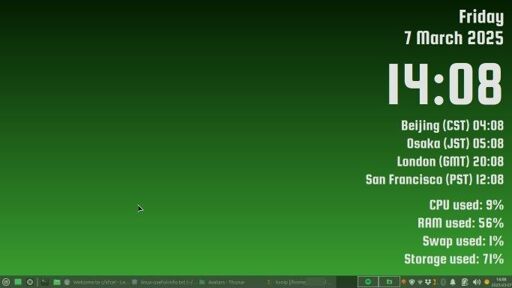
By all means post some screenshots of your Xfce desktops in this thread and feel free to use this thread as a way to get more familiar with the platform and get to know one another.
I have no master plans for this instance. There are no plans, from me, to shut down r/xfce. This is a new place, same topic. If you like it here, great. It's up to you to help build and maintain it. If you don't like it, that's fine too. Go to the community/forum you enjoy most and please don't bitch about it here.
I'm new here too, so I am open to suggestions on how to make this a useful place to visit.
For now, the only rules I have for this space are:
- Keep it Xfce related
- Be polite & respectful of one another
I've also created a similar space over at https://fedia.io/m/xfce if you are curious about how that platform works

Xfwl4 Preview Release Available
The first Xfwl4 Preview Release in now available.
xfwl4 is our brand new Wayland compositor for Xfce.
Read the blog post from our core developer Brian Tarricone for details:

Any XFCE Themes to recomenned?
So i basically use XFCE since my First Time using Linux and im very much fine with it :P tho what i am missing is some Themes outside of the Basic Black and White >.> Especially considering sadly that most XFCE Themes are either made for GTK2 or simply made for KDE there doesnt seem to be many Options still left :( Maybe thats just me Thing but i also dislike the AdLib Themes from https://store.kde.org/p/2320010 for XFCE a lot sadly :( Like itd love to maybe get a Glossy Theme like in WIndows XP the Grey "Metal" Looking Theme or 7s Default Theme >.>
Xfwl4 FAQ
A FAQ page is now available regarding the work Xfce/Brian is doing to build Xfwl4, an Xfce Wayland Compositor.
Xfwl4 - The roadmap for a Xfce Wayland Compositor
We, the Xfce team are excited to share some great news!
After careful consideration, we’ve decided on a meaningful way to use the generous donations from our community: funding longtime Xfce core developer Brian Tarricone to create xfwl4, a brand-new Wayland compositor for Xfce.
This initiative will utilize a significant portion of the project’s donated funds, but we believe it’s an important investment in Xfce’s future.
The goal is, that xfwl4 will offer the same functionality and behavior as xfwm4 does, or as much as possible considering the differences between X11 and Wayland. Using xfwl4 should feel just like using xfwm4 on X11. We even plan to reuse the existing xfwm4 configuration dialogs and xfconf settings to ensure a seamless transition.
Xfwl4 will not be based on the existing xfwm4 code. Instead, it will be written from scratch in rust, using smithay building blocks.

Policy changes to registration at gitlab.xfce.org
From the Xfce mailing list: "Dear Xfce users and contributors, I would like to bring to your attention a change regarding registration on our GitLab instance.
Due to increased spam activity and Google making reCAPTCHA more difficult to use, we, the core developers, have decided to suspend new registrations until further notice.
New users can still create accounts via SSO, meaning a GitLab.com or GitHub account will be required for new contributors.
As a tentative measure, newly created users will no longer need to request fork permissions, we hope this helps lower the entry barrier.
This change is planned to take effect on 2025-02-15 (Saturday). For more details, please refer to: https://wiki.xfce.org/howto/gitlab_signup.
Cheers, Andre Miranda"
xfce4-weather-plugin - update required
For additional details on the issue, see https://gitlab.xfce.org/panel-plugins/xfce4-weather-plugin/-/issues/88
e: FYI - updated plugin landed in Debian testing today(20250321) https://tracker.debian.org/pkg/xfce4-weather-plugin

Colour-differentiated workspaces
New to Lemmy.
And new to workspaces. I'd get confused at first which workspace I was on.
Different backgrounds helped a bit, but I'm almost always in maximized windows.
I wanted to have different colours for windows, panel etc but couldn't.
So I adjusted panel opacity to 95% on Enter, 75% on Leave. That allows the background colour to bleed through.
A user on the Linux Mint forums suggested adjusting workspace margins to let the background show even when windows are maximized.
So now I have an 8-pixel strip of desktop showing just above the panel. Combined with the lowered panel opacity, I never have to wondr anymore what workspace I'm on.
https://pixelfed.ca/i/web/post/803729306382291972
- Workspace [1/2/3] with windows minimized.
- Workspace [1/2/3] with window maximized, panel at "Leave" opacity of 95%.
- Workspace [1/2/3] with window maximized, panel at "Enter" opacity of 75%.
(I read somewhere that it's better to host images for Lemmy on Pixelfed. So I made my first post there with all the screenshots, and linked to it. Hope that works.)
PS: Anyone have any other ideas to help distinguish workspaces at a glance?
 https://pixelfed.ca/p/klu9/803729306382291972Open linkView original on lemmy.ca
Xfce keyboard shortcuts
In preparation for some other documentation that I am currently working on, I "accidentally" managed to build a page of Xfce keyboard shortcuts for the xfwm4 window manager and some default application shortcuts.
Perhaps you will find it useful.

xfce, mpv: media title scrolling in the panel.
cross-posted from: https://lemmy.world/post/21801277
https://gitlab.com/christosangel/genmon-mpv
This project is created for use with the xfce desktop environment, and the mpv media player.
With the use of the Generic Monitor panel plugin, it displays scrolling the name of the file or the stream playing with mpv.
If another instance of mpv starts playing, genmon-mpv will display the most recently opened title of file/stream.
As soon as an mpv instance displayed is closed, and another previous instance is still open, genmon-mpv will display the title of the still open file/stream.
This project is consisted of two scripts, one in bash, and one in lua. Any feedback is most welcome.
 https://gitlab.com/christosangel/genmon-mpvOpen linkView original on lemmy.world