

Colour-differentiated workspaces
New to Lemmy.
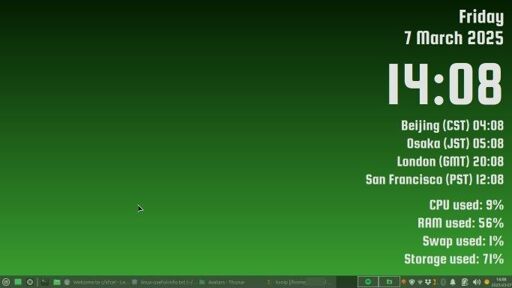
And new to workspaces. I'd get confused at first which workspace I was on.
Different backgrounds helped a bit, but I'm almost always in maximized windows.
I wanted to have different colours for windows, panel etc but couldn't.
So I adjusted panel opacity to 95% on Enter, 75% on Leave. That allows the background colour to bleed through.
A user on the Linux Mint forums suggested adjusting workspace margins to let the background show even when windows are maximized.
So now I have an 8-pixel strip of desktop showing just above the panel. Combined with the lowered panel opacity, I never have to wondr anymore what workspace I'm on.
https://pixelfed.ca/i/web/post/803729306382291972
- Workspace [1/2/3] with windows minimized.
- Workspace [1/2/3] with window maximized, panel at "Leave" opacity of 95%.
- Workspace [1/2/3] with window maximized, panel at "Enter" opacity of 75%.
(I read somewhere that it's better to host images for Lemmy on Pixelfed. So I made my first post there with all the screenshots, and linked to it. Hope that works.)
PS: Anyone have any other ideas to help distinguish workspaces at a glance?
 https://pixelfed.ca/p/klu9/803729306382291972Open linkView original on lemmy.ca
4 replies
Based on the thumbnail, for a second I thought someone was posting about Yes' classic prog rock album, Close to the Edge.
I only started listening to Yes a few years ago, and on streaming. So I only think of it with the big yellow borders.
But I see it now :)
Hi. Thanks for sharing your tip. However, I'm not seeing the links to your screenshots.
Could you check your link formatting?
Hmmm, link works for me both in desktop web browser and in Voyager mobile app.
I'll post a plain URL in my main post and here in this comment.
https://pixelfed.ca/i/web/post/803729306382291972