
Passing a Camel through the eye of a needle -The Thought Emporium [02:22]
Mark, if you're listening, you gotta go deeper next time
View original on beehaw.org
Mark, if you're listening, you gotta go deeper next time
jerk-sock
old car
perfectly good tennis balls
dry wall
sharp blades
art degree
Any more suggestions?

Losing internal links is a common pain holding back many users from switching from one program to another. Well, fellow community member @cysacenda have just created a plugin that allows you to seamlessly replace internal links from Evernote format to Joplin format.
Since this replacement must modify your data, process is not done by default in the migration process when importing .enex files in Joplin, but with this plugin, you can make the transition with ease.
This feature inspired me to finally transcribe my pile of handwritten notes 😳 😉
::: spoiler Here's more about it
What's new in Joplin 2.11 - News - Joplin Forum
The Android mobile app now support offline voice typing - it means your voice recording does not need to be uploaded to Google or Samsung server - it all takes place on your device for added security. To make use of it, open any note, tap on the three dots menu, then "Voice typing".
The first time, the app will need to download the language files to your device:
Once they are there, simply record your message and it will appear in the note:
:::
Given many new handhelds coming on the scene and general disinterest of Microsoft to support the market, do you think SteamOS will take place of default OS the same way Android did on phones some time ago?
Available Filters:
- Collections: add games in a collection to the tab
- Multiple: will restrict it to games in all specified collections
- Regex: filters game titles using a regex (for testing, use this website)
- Installed: filters games by if they are installed or not
- Friends: filters games by if they are owned by a friend as well
- Multiple: depending on mode, either game must be owned by all friends, or at least 1 friend
- Mode: “and” means all friends must own, “or” means any
- Tags: filters games by if they have a given tag associated with them
- Multiple: depending on mode, either game must have all tags, or at least 1 tag
- Mode: “and” means must have all tags, “or” means any
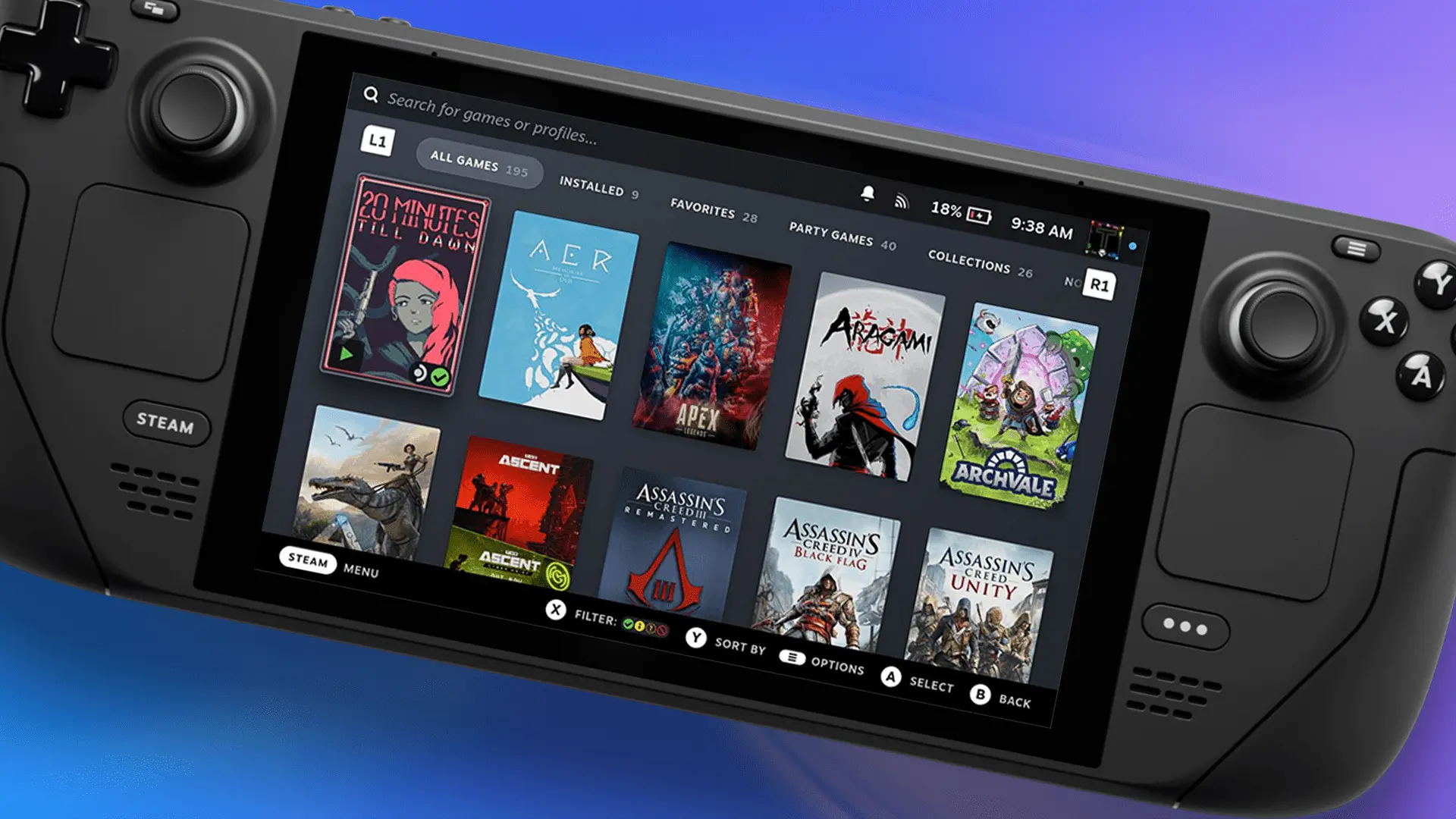 https://steamdecklife.com/2023/07/03/tab-master-steam-deck-plugin/Open linkView original on beehaw.org
cross-posted from: https://lemmit.online/post/25800
My 10 most played (and enjoyed) games on the Steam Deck over the last year. What are your favorites?
Here’s the list with basic Performance and overall ratings (No particular order):
*Shadow of Mordor - 8.5
Highly recommend. Great Story, Smooth gameplay with a low skill floor and high skill ceiling, and tons of fun to be had with the Orc Nemesis system. I hear great things about the sequel, but I just had to get this off my backlog because it’s been there since launch. Glad I had this gem to kick off my SD journey. It Runs almost flawlessly with good settings.
*No Man’s Sky - 8.75
(if it’s your thing, incredible) For a colorful space-feels survival game, look no further. Relaxing or challenging depending on what you’re looking for, the game setting are yours to command. Superb exploration mechanics and a dev team that only gets better with age. 100% worth the go.
*The Witcher 2 - 8.0
Oldie but a goodie. Runs locked 45 with high graphics start to finish. Or 60 FPS with some dips. Honestly, I just turned the frame counter off and I stopped noticing. Story is awesome, and for a medieval bang-me simulator, no one does it better. The combat and controls take a little getting used to, but there are some great community layouts (including mine). It’s an often overlooked game that is worth your time, and money — especially because it goes on sale all the time.
*The Elder Scrolls III: Morrowind - 9.999
Needs no introduction. It’s Morrowind — Nuff said. It runs perfectly with maxed out everything. You can even get all your favorite mods going with a little guile and elbow grease. I’d give it 10 but nothing is perfect, and let’s be honest this game has a lot of jank. It’s really just rated highly because of what a perfect fit it is on Deck. Also, it’s one of my favorite games of all time, so I’m biased. Any complaints about the game I’ve long since come to terms with. The animation is whacky and stiff even for the time, and the character models are bizarre and disproportionate. The textures need updating, but with a few mods, this game is gorgeous, and even without it’s still an absolute masterpiece of story music and voice acting. The RPG mechanics are deep and satisfying. Truly, they don’t make games like this anymore. You’re almost meant to be able to break it using the in game systems, turning you eventually into an omnipotent god. What a great game on the go, and it gets bonus points for the nostalgia feels.
*Elden Ring - 9.25
Graphics 10, Story 10, Gameplay and Controls 10, Sound and music 9 (a little crunchy sometimes and needs some balancing between the music and sound effects. It comes with the volume WAY too over cranked so I recommend having a fiddle to get it where you like it) Performance 8 (It’s a newish Next Gen AAA game. It’s a miracle it runs at all. I just lock it at 45 and turn off the frame counter and don’t notice the dips. It’s had substantial updates since the SDs launch that have really optimized the performance, I’ve only recently noticed some hiccups during a cutscene as the camera cut to different angles. Might have something to do with stream loading) Overall 9.25. Worth the time and money, and the performance issues were minor, few and far between.
*Hogwarts Legacy - 9
WHOA. What a game. So surprised by this. Can’t believe it runs on The Deck. Similar score to Elden Ring. I give it maybe a 9 overall, simply because the main story is kinda Meh. However the side quests and NPCs and world building more than makeup for it. Gameplay is phenomenally great. Flying on a broomstick, check, tight combat, check, exploring Hogwarts fully and unhindered, check. They’ve somehow managed to Souls-Like-ify Harry Potter, and I’m not mad at all. Pick it up and live your best Wizard life.
*Kerbal Space Program - 7.75
Get weird and build some rockets bro. Great building, physics and flight sim, with a silly little green men from space twist. Runs perfectly unless you get a little too carried away with parts, but dude… this game can make even modern PCs chug if you get know how. Fun pick up for the Deck, though the controls needs a touch of love from the community layouts. Have a look there and you won’t go wrong.
*Mass Effect Trilogy - 8.75
It’s Mass Effect, finally in a full trilogy on steam, and all three games run great on deck. This was BioWare at its best, and if you’re missing out on one or all of these games in the series, it’s worth a go in deck. Graphics are great, sounds and music are amazing, gameplay is a great balance of shooting and magic, with fun exploration and incredible story telling. Romance options are a huge feature— for a Space-Age bang-me simulator, this is your best bet. Go romance a tentacle headed alien and save the universe from the Reapers. THREE TIMES. Overall great value.
*Halo Infinite (multiplayer only) - 8.5
I couldn’t be bothered with the campaign, but this was great for my FPS fix. Gyro controls make quick work of the console plebs, and keep toe to toe with the PC master race. If you like Halo, well… it’s Halo. Go forth and SLAY, Spartan!! Graphics are great, performance is great, sound is meh — but who cares it’s Halo, and controls are muah chef’s kiss.
*PREY - 9.25
Yikes. I had never played this game before. What a mind-fuck. Graphics are a insanely good, sound, music, lighting, all perfect for the story telling which is absolutely king in this. Story is literally out of this world. I can say no more —play it yourself. Controls are great for a Bethesda mini-action-RPG. It’s basically Bioshock… in Space. Great fun. Only draw back is that it’s a bit short in my opinion. Still, it’s perfect on the deck, suspend your game anywhere and pick it up in bits and chunks. Would you kindly give it a go on your Steam Deck?
There it is. My top 10… for now.
This is an automated archive made by the Lemmit Bot.
The original was posted on /r/steamdeck by /u/inspiredtobeinspired on 2023-06-26 12:39:38+00:00.
If you created a sub, by default not a single person get notified about it: it can only be seen in the communities list of your instance. But don't worry it's pretty easy to change it
[Search to federate this sub to your instance](/search/q/!sub-name@instance/type/All/sort/TopAll/listing_type/All/community_id/0/creator_id/0/page/1). It will direct people to search for your community on their own instance.That's it, by reposting it just twice you dramatically increase discoverability of your community. Of course you may find additional community-promo subs but posting in at least these basic two is a good start
Good luck!
Lemmy 0.18.0.
[This link will fetch CommunityName to your instance](/search?q=!communityname%40instance&type=Communities&listingType=All&page=1&sort=TopAll)
Change communityname with community name, and instance with instance link (without https://) ↩
kindly cross-posted from: https://lemmy.fmhy.ml/post/112584
Since the subreddit got killed, I'll post the settings I'm currently using. I'm getting a mostly-ok 30fps, with dips down to 20. Definitely playable. Shrines can spike to 50-60 fps, which is nice. If anyone has tweaks to improve performance I'd love to hear it.
Using SteamOS 3.4.8 with Stable OS Updates and Beta Client Updates
Yuzu EA 3691 Settings:
Add-Ons-
'Update 1.1.1'
'Graphics - Shadows - 512x - performance boost'
'NoFog - Performance'
'Steamdeck UI Mod v7- Normal - White'
'Ratio - 16-10 (Steam Deck)'
'FPS - DynamicFPS++-60fps, DynamicFPS, Cutscene-Fix, Vertical Sensitivity Fix'
'Graphics - Island Fix'
'Graphics - LOD Improvement
General-
Limit Speed Percent: 100%
Multicore CPU Emulation: [x]
CPU-
Accuracy: Unsafe
Unsafe CPU Optimization Settings: [all checked]
Graphics-
API: Use global configuration (Vulkan)
Use disk pipeline Cache: [x]
Use Asynchronous GPU emulation [x]
Accelerate ATSC texture decoding [x]
Vsync mode: FIFO
NVDEC emulation: Use global configuration(GPU Video Decoding)
Fullscreen mode: Exclusive Fullscreen
Aspect Ratio: Force 16:10
Resolution: 1x
Window Adapting Filter: Bilinear
Anti-Aliasing Method: None
FSR Sharpness: 88%
Advanced Graphics-
Accuracy Level: Normal
ATSC recompression: Uncompressed
Enable asychronous presentation: [ ]
Force maximum clocks: [ ]
Decode ATSC textures asyncronously: [ ]
Enable Reactive Flushing: [x]
Use asyncronous shader building: [x]
Use Fast GPU Time: [x]
Use Vulkan pipeline cache: [x]
Sync framerate of video playback: [ ]
Barrier feedback loops: [x]
Anisotropic Filtering: Default
SteamOS Performance Settings:
Use per-game profile: On
Framerate Limit: Off
Refresh Rate: 60
Allow Tearing: On
Half Rate Shading: Off
TDP Limit: Off
Manual GPU Clock Control: On
GPU Clock Frequency: 1200
Scaling Filter: Linear
PowerTools Settings:
CPU-
SMT: On
Threads: 8
Frequency Limits: Off
Governor: performance
GPU-
Powerplay Limits: Off
Frequency Limits: Off
Downclock Memory: Off
Persistent Profile: On
CryoUtilities 2.1.4 Default Settings
I apologize if some of this is superfluous or if I missed something, its been a couple weeks since I set this up. I got these settings from a post on the subreddit and tweaked them a bit. I'd love to credit that user, but subreddit nuke :(
EDIT: formatting
 https://external-content.duckduckgo.com/iu/?u=https://i.ytimg.com/vi/YdJcx7-i23I/maxresdefault.jpg&f=1&nofb=1&ipt=e62fec6f74907bca37ba471643fd88d426f345087def2c27b2304869fc3720b9&ipo=imagesOpen linkView original on beehaw.org