

A Visual Guide to SSH Tunnels: Local and Remote Port Forwarding
SSH is yet another example of an ancient technology that is still in wide use today. It may very well be that learning a couple of SSH tricks is more profitable in the long run than mastering a dozen Cloud Native tools destined to become deprecated next quarter.
One of my favorite parts of this technology is SSH Tunnels. With nothing but standard tools and often using just a single command, you can achieve the following:
- Access internal VPC endpoints through a public-facing EC2 instance.
- Open a port from the localhost of a development VM in the host's browser.
- Expose any local server from a home/private network to the outside world.
And more 😍
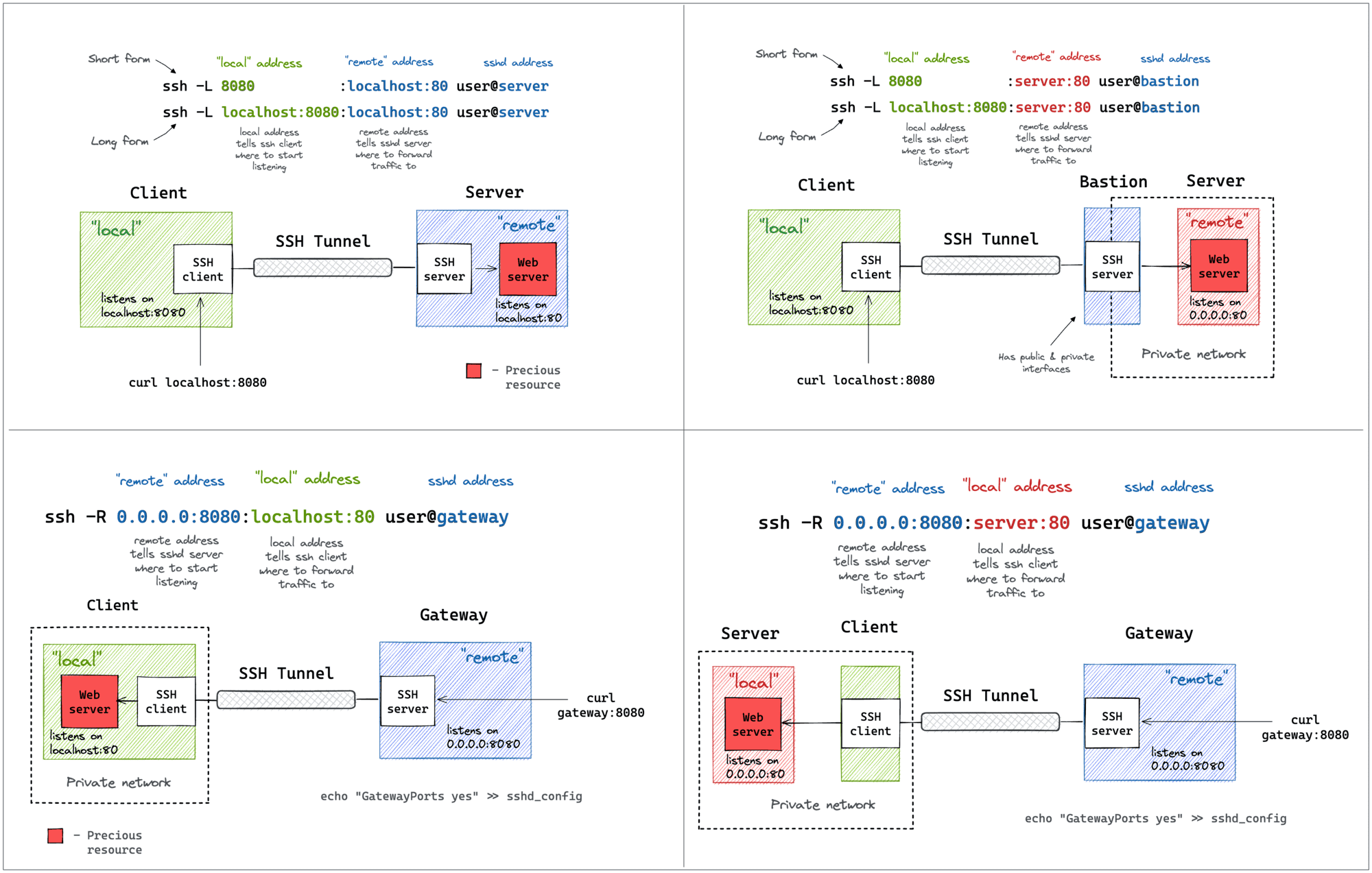 https://iximiuz.com/en/posts/ssh-tunnels/Open linkView original on programming.dev
Thanks, bookmarking that. I always get -L and -R mixed up and have to look up examples, this one looks very handy.
Easy way to remember: with
-Lyou are binding the port Locally, with-Ryou are binding the port remotely.ssh tunneling can be very useful for testing or one-shot things where you quickly need access to a service that's not directly reachable, but I wouldn't use it as a permanent solution for anything. You quickly run into problems like:
localhost:8080isfoo:80andlocalhost:8081isbar:80SSH Reverse Tunneling is super useful to get remote systems connected which only have very limited internet access through mobile carriers. They usually do NAT and you have no chance to connect to these sites with a dial-in VPN or other technologies that require YOU to connect to the remote system. So we just create a reverse ssh tunnel with autossh that is kept alive by the remote system itself and we connect back to the system to the ssh tunnel. Since ssh is installed anyway, that is one of the simplest and most versatile options to connect to these systems for us.
Great resource, thanks for sharing
The clean new syntax for jumping is great too.
ssh -J jump.example.com target.example.comCheck out https://wiki.gentoo.org/wiki/SSH_jump_host